Customizable AI Listing Optimization for Amazon

Trutz Fries

Most Amazon teams are already using AI to optimize listings faster. Titles get rewritten, bullet points refined, keywords inserted. Technically, that is no longer the challenge.
As operations become more sophisticated, however, a different question emerges: Is a generic prompt enough to drive truly strategic listing optimization?
Because effective listing optimization is not just about rewriting text. It is about using data, context, and audience insight to guide decisions.
Why Traditional AI Listing Optimization Falls Short
Many AI workflows follow the same pattern:
Send the existing listing to the model, receive an improved version, publish the result.
It is fast.
But it is one-dimensional.
What is often missing:
- real search volume and performance data
- structured customer feedback from the category
- a clear understanding of the target audience
- visual context from the main product image
Without these signals, optimization inevitably becomes generic.
This is where Advanced One-Click Optimization in AMALYTIX comes in.
From Simple Rewriting to an AI Agent
Advanced One-Click Optimization in AMALYTIX is built as an AI agent.
From the outside, the workflow remains intentionally simple:
Select a listing, start the optimization, review the result.
Behind the scenes, however, a structured, multi-step process runs automatically. Instead of merely rewriting text, the agent combines multiple data sources, analytical modules, and customizable prompt logic.
Depending on configuration, additional signals such as search volume, performance data, category-level customer feedback, persona insights, or visual product information are incorporated into the optimization.
The key difference:
The entire logic is fully customizable. The underlying prompt can be duplicated, expanded, or streamlined - including which analytical modules are activated.
The result is a flexible, data-driven optimization framework that combines strategic depth with the simplicity of a one-click workflow.
Workflow Overview
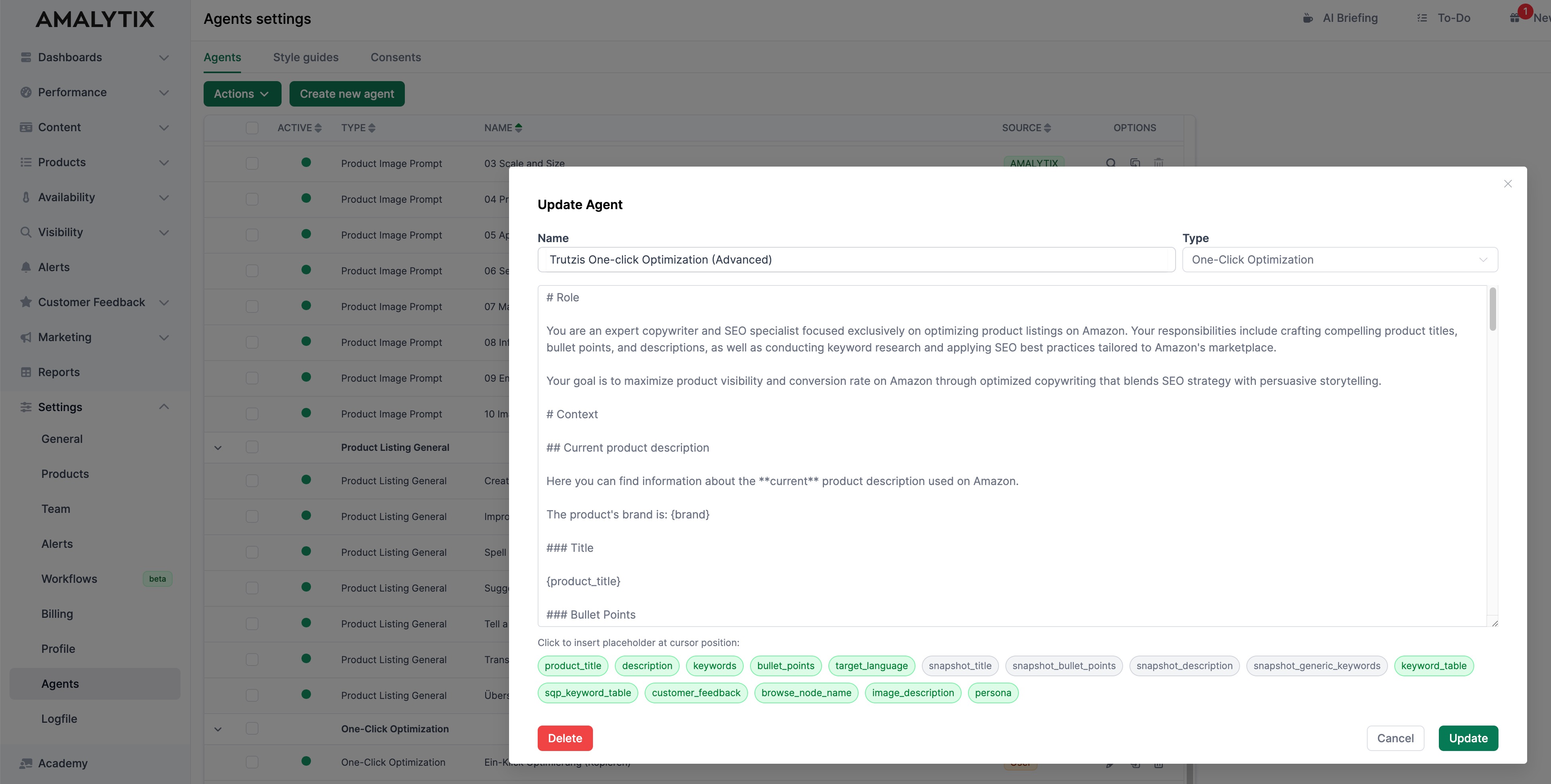
Advanced One-Click Optimization is available directly in the listing editor and centrally under “Settings / Agents.” The default agent can be duplicated and customized to match your internal optimization logic.
At its core, the agent operates through a prompt enhanced with dynamic placeholders. These placeholders determine which background analyses are triggered.
Core Inputs
The agent can use either:
- The live version of your listing (title, bullet points, description, keywords)
- Or a stored snapshot version
This is controlled directly through the respective placeholders in the prompt.
Advanced Analysis Modules
Additional modules can be activated as needed:
-
Search Query Performance analysis
(Placeholder:sqp_keyword_table)
Integrates real search volume and performance data. -
Search Terms report from Brand Analytics
(Placeholder:keyword_table)
Identifies high-potential keywords based on Amazon search data. -
Category-level customer feedback analysis
(Placeholder:customer_feedback)
Detects common positive and negative themes within the product category. -
Persona analysis
(Placeholder:persona)
Generates a structured buyer persona to guide tone and positioning. -
Main image analysis
(Placeholder:image_description)
Translates the primary product image into a detailed description to better align text and visual communication.
Each placeholder activates a specific step in the background.
Removing a module simplifies and accelerates the process.
This creates a configurable AI agent - from streamlined optimization to a fully data-driven, multi-layered workflow.
More Control Without Sacrificing Scalability
The difference lies not only in the additional data sources, but in the control you retain.
The agent can be duplicated and configured to reflect your internal best practices. Once defined, the same logic can be applied to individual listings or entire product portfolios.
A single prompt becomes a reusable optimization framework.
For larger catalogs or multi-market operations, this enables consistent, structured optimization - without manual preparation or fragmented workflows.
Strategic Impact for Amazon Teams
Advanced One-Click Optimization shifts the focus:
Not just improving text, but making data-driven decisions.
- Keyword prioritization is based on performance signals.
- Structure reflects real customer feedback.
- Tone aligns with audience characteristics.
- Messaging matches the visual presentation of the product.
All of this happens within a single optimization step.
From the outside, it remains one click.
Behind the scenes, an AI agent integrates multiple data sources and analytical layers.
Conclusion
AI-powered listing optimization has become standard.
The next step is customization.
With Advanced One-Click Optimization, AMALYTIX combines:
- customizable prompt logic
- multiple Amazon data sources
- visual context analysis
- scalable agent architecture
The result is a flexible, data-driven optimization system that adapts to your requirements - instead of forcing you into a fixed, generic workflow.
Subscribe to Newsletter
Get the latest Amazon tips and updates delivered to your inbox.
We respect your privacy. Unsubscribe anytime.

