Automated Amazon Listing Updates with Workflows

Trutz Fries

Amazon listings do not always remain the way you originally published them.
Titles change, bullet points drift, images get replaced.
You notice the deviation, restore the snapshot, and push the update back to Amazon. The next day, the cycle starts again.
For many teams, this is not an exception - it is part of daily operations.
The Structural Problem: Content Deviations
If you manage Amazon listings at scale, you are already monitoring snapshot deviations.
Restoring a snapshot in AMALYTIX is straightforward: Select the product, choose the affected fields, and transfer the snapshot back to Amazon. The individual action is simple. The real issue is repetition.
When deviations affect multiple products, brands, or marketplaces, manual restoration turns into an operational loop. It consumes time, requires constant attention, and introduces inconsistency.
From Reactive Fixes to Rule-Based Automation
With Workflows, AMALYTIX introduces a new layer: rule-based automation.
The first available workflow type focuses on one of the most common operational tasks: Listing Update.
Instead of manually restoring content every time a deviation occurs, you define the rule once. From that point forward, the system applies it automatically.
How Automated Listing Updates Work
Under Settings / Workflows, you can create a workflow of type Listing Update.
Within the workflow, you define:
- Which listing fields should remain synchronized (title, bullet points, keywords, images)
- Which products the rule applies to (by marketplace, brand, product list, tags, or specific ASINs)
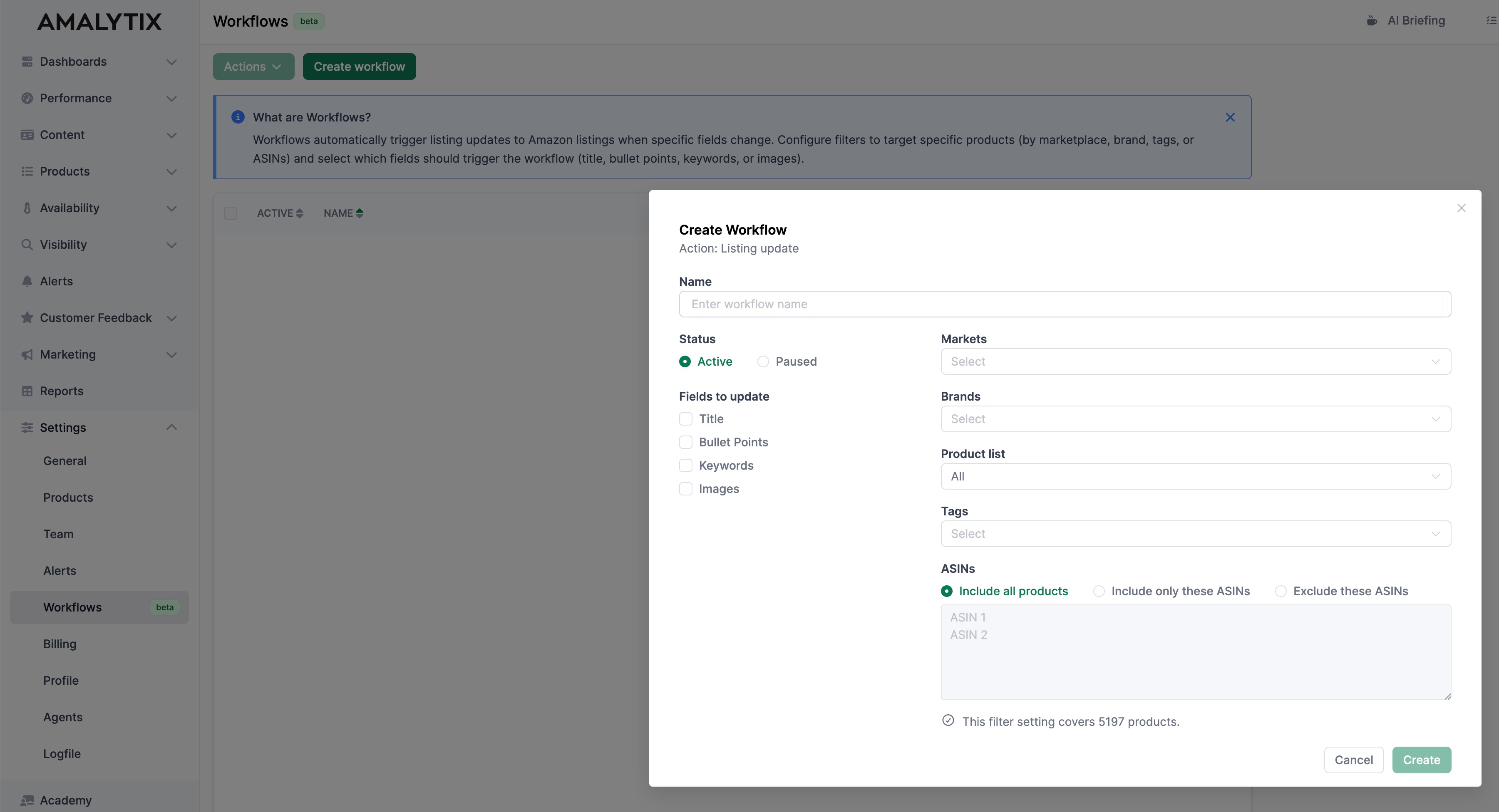
AMALYTIX checks for snapshot deviations once per day. If a deviation is detected and the product matches the workflow criteria, the corresponding listing update is triggered automatically.
The update itself is identical to the manual action you would otherwise perform. The difference lies not in the action - but in the automation of the rule.
Flexible Control Across Product Groups
Workflows can be configured for different segments of your portfolio.
For example:
- Automatically keep titles synchronized for all products with a specific tag
- Update bullet points only in selected marketplaces
- Exclude specific ASINs from automation
This allows you to build structured automation layers tailored to different operational needs.
Instead of reacting to individual deviations, you establish systematic governance rules.
Operational Impact for Amazon Teams
Automated listing updates shift the workflow:
From reactive corrections to structured process design.
- Recurring tasks become predictable.
- Manual intervention is reduced.
- Content consistency improves.
- Operational overhead decreases.
Most importantly, listing governance becomes scalable.
And this is only the beginning. Workflows are designed as a framework for gradually automating recurring operational tasks - starting with listing updates.
Conclusion
Content drift is a common reality in Amazon operations. Manual snapshot restoration works - but it does not scale.
With Workflows in AMALYTIX, you define once which products and which fields should remain synchronized. When deviations occur, listing updates are triggered automatically.
The result is a rule-based, structured approach to listing governance - built for teams operating Amazon at scale.
Subscribe to Newsletter
Get the latest Amazon tips and updates delivered to your inbox.
We respect your privacy. Unsubscribe anytime.

