On-Brand AI Images for Amazon

Trutz Fries

The current generation of AI image models has made a noticeable leap in quality over the past few months. With models such as Gemini 3 or GPT Image 1.5, it is now possible to generate product images that can often be used directly for Amazon without any post-editing. Realistic materials, clean lighting, and convincing perspectives are no longer a bottleneck.
We have closely followed this development and tested various AI models in an Amazon context. The results clearly show how much quality and usability can differ between models. The latest generation delivers a level of image quality that would have seemed unthinkable just a short time ago.
At this point, however, a new question arises: if AI images have become this good technically, why do they still feel off in so many listings?
Why AI Images Quickly Feel Generic Without Style Control
A single AI-generated image can look convincing on its own. Things become more challenging when multiple images need to work together. In practice, AI images are often high-quality, yet visually inconsistent. Colors, composition, and overall mood vary from image to image. Within a single listing or across multiple products, this quickly leads to an uneven visual impression.
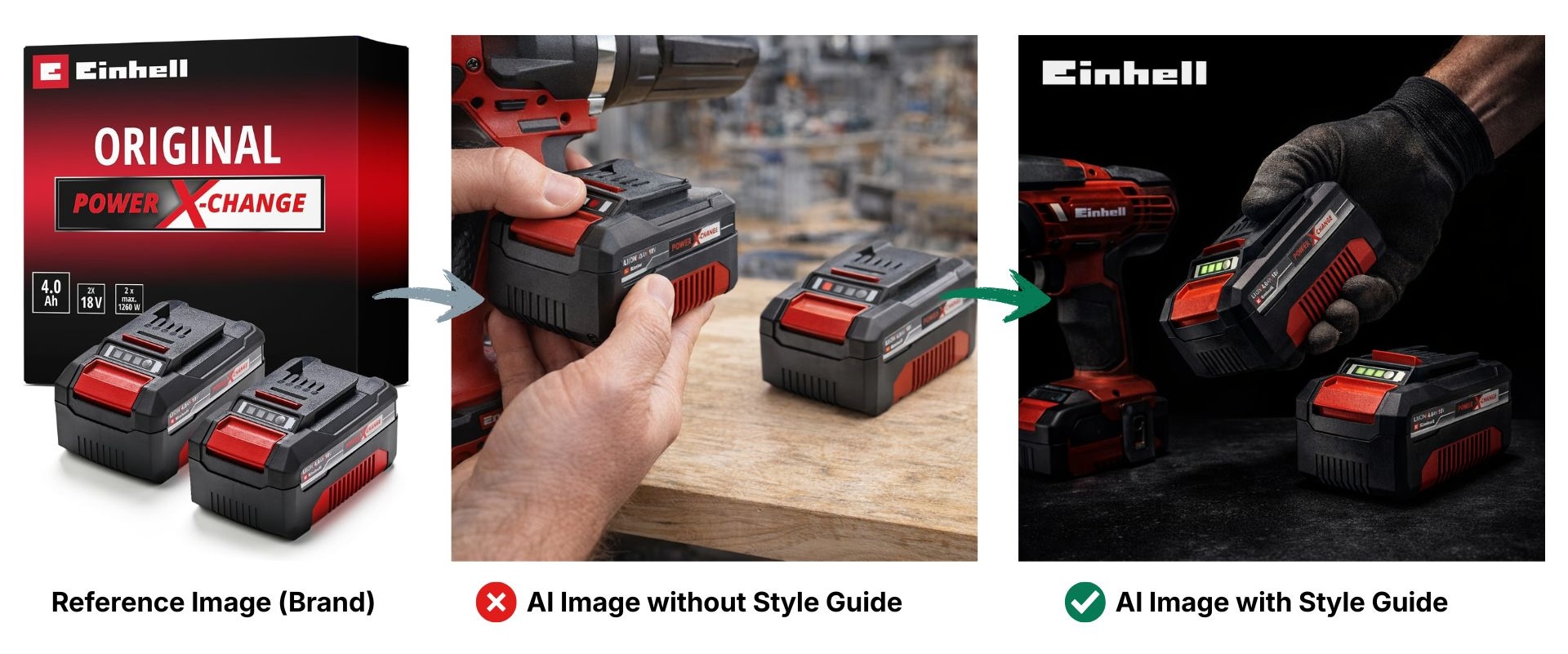
The reason for this is not the image quality of the models, but how they are guided. Traditional prompts primarily describe image content. They define what should be shown, but not how the image should feel. Without explicit style guidance, the AI makes new visual decisions with every generation, inevitably leading to inconsistent results.
Anyone who wants to create on-brand AI images therefore needs to go one step further and define visual style rules just as clearly as the image content itself.
Style Guides: The New Layer for Consistent AI Visuals
With the new Style Guides feature, AMALYTIX adds this missing layer to its AI image generation feature. Style Guides make it possible to explicitly define visual style guidelines and reuse them consistently for image generation.
A style Guide describes the visual appearance of a brand or campaign. This goes beyond colors or typography and includes the interaction of color mood, background logic, lighting, overall atmosphere, and composition. The Style Guide is automatically derived from existing reference images.
The result is a clearly structured description of a brand’s visual look that provides concrete visual guardrails for the AI and can be combined directly with the meta prompt used for image generation.
The Style Guide Workflow in AMALYTIX
Style Guides are seamlessly integrated into the existing AI image generation workflow and can be used in just a few clicks.
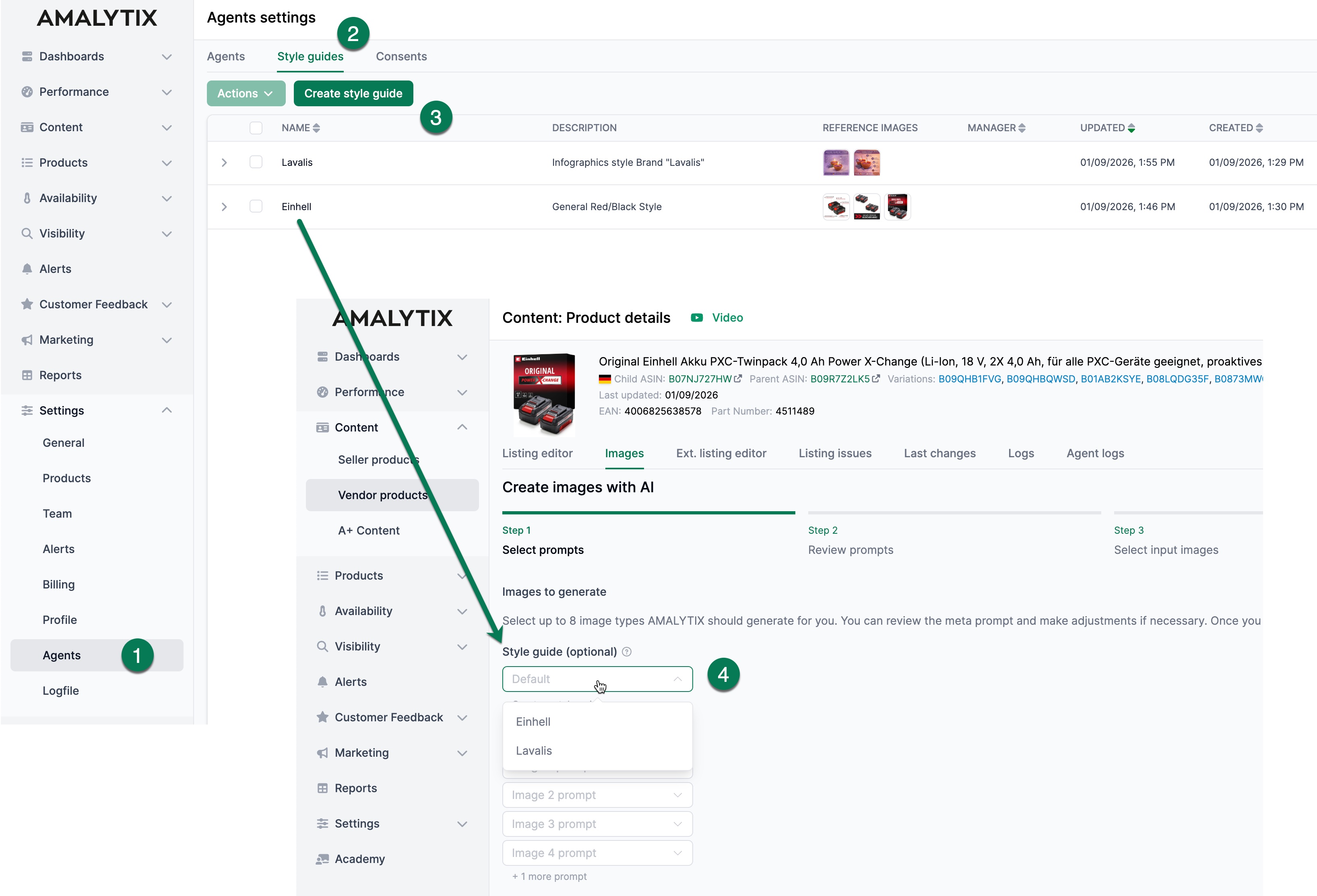
How it works:
-
Open the “Settings / Agents” section
Style Guides are managed centrally in the settings and are independent of individual products. -
Switch to the new “Style Guides” tab
This is where all existing Style Guides are managed and new ones can be created. -
Create and save a new Style Guide
Based on selected reference images, the AI analyzes recurring visual patterns such as color behavior, lighting, background logic, and overall mood. The resulting Style Guide can be saved and adjusted if needed. -
Apply the Style Guide when generating images
When generating AI images, a saved Style Guide can be selected optionally. The generated images then consistently follow the defined style guidelines.
Done.
Without adding prompt complexity, AI images are created that visually fit together and reliably reflect the desired brand or campaign look.
More Consistency Without Additional Effort
Style Guides are deliberately designed as an optional feature. Users can continue to generate AI images quickly without any extra steps. At the same time, Style Guides offer a simple way to systematically build visual consistency.
The benefits become especially clear for larger product portfolios or ongoing campaigns. Instead of manually editing each image, a reusable style framework guides the AI in a consistent direction.
Conclusion
AI image models now deliver impressive image quality. The next decisive step, however, is style control. Style Guides add exactly this component to AI image generation in AMALYTIX.
Style Guides can be derived from existing visuals, stored in a central library, and optionally applied to every image generation. The result is AI imagery that is not only high-quality, but also visually consistent and clearly aligned with a brand’s presence on Amazon.
Subscribe to Newsletter
Get the latest Amazon tips and updates delivered to your inbox.
We respect your privacy. Unsubscribe anytime.

