Amazon Vendor Central API: Endpoints, Access and Setup (2026)


Amazon has paid you. But which invoice did that payment settle, and what did Amazon deduct? In Vendor Central, the answers are spread across several pages. The Amazon Vendor Central API brings that data into your own systems.
The Amazon vendor API is the part of the Selling Partner API (SP-API) that vendors use. Through this REST interface, your systems exchange purchase orders, shipment confirmations, invoices, remittances, listings and reports with Amazon. An API (application programming interface) connects two programs so they can exchange data.
Before the SP-API, vendors could exchange data with Amazon only through EDI, which uses fixed message formats. You can keep using EDI alongside the API. Seller Central had API access for years through the Amazon Marketplace Web Service (MWS). Amazon shut down MWS on April 1, 2024.
This article shows which API fits which task, what is new in 2026 (the Invoices API and the Finance Remittance API) and how to get API access. You no longer need an AWS account for it. For an overview of the SP-API and the Ads API, read our article on the Amazon API.
Which APIs can Amazon vendors use?
Confirm a purchase order, submit an invoice, download a report: for each task, you use a different part of the Vendor Central API:
| Task | API |
|---|---|
| Receive and acknowledge purchase orders (POs) | Vendor Orders API |
| Send shipment confirmations (ASN) | Vendor Shipments API |
| Submit invoices | Vendor Invoices API (formerly “Vendor Payments API”) |
| Get invoices and their payment status | Invoices API v2026-06-25 (new) |
| Get remittances | Finance Remittance API v2026-03-17 (new) |
| Change listings | Listings Items API |
| Reports (Brand Analytics, Retail Analytics) | Reports API, Data Kiosk |
| Direct Fulfillment (orders, labels, invoices, inventory) | Direct Fulfillment APIs |
| Notifications | Notifications API (Retail Analytics events only) |
Amazon lists Catalog Items, Reports, Notifications, Data Kiosk and Listings Items as APIs “for sellers and vendors”. The A+ Content API also appears in Amazon’s overview of vendor use cases.
Vendors can send inventory levels to Amazon by API only in Direct Fulfillment, through the Direct Fulfillment Inventory API.
Amazon currently charges no fees for the SP-API. Since August 25, 2026, however, stricter policies apply, above all on data protection.
Vendor Retail Procurement APIs
Amazon orders from you. You deliver to Amazon’s warehouses and send the invoice. For this process, you use the Vendor Retail Procurement API with its four APIs. Two more were added in 2026.
Vendor Orders API
With the Vendor Orders API (version v1), you receive purchase orders and send acknowledgements. If you can’t fulfill an order, you reject it through the same API.
The API offers four operations:
- get a list of all purchase orders in a date range, with all order details (
getPurchaseOrders) - get a single purchase order (
getPurchaseOrder) - acknowledge or reject purchase orders (
submitAcknowledgement) - check the status of purchase orders (
getPurchaseOrdersStatus)
Vendor Shipments API
The goods are on their way. With the Vendor Shipments API (v1), you exchange the shipping documents with Amazon. The most important operation is the shipment confirmation, the ASN (SubmitShipmentConfirmations). It contains the shipped items, the purchase order number, the ship date and the expected delivery date. This helps Amazon receive the shipment efficiently.
There are three more operations:
- send a shipment request (
SubmitShipments) - get details on your shipments (
GetShipmentDetails, in North America and Europe) - get shipping labels (
GetShipmentLabels, North America only)
Vendor Invoices API
The former “Vendor Payments API” is now called the Vendor Invoices API (v1). Amazon’s documentation lists it as the “Vendor Retail Procurement Invoices API”. With submitInvoices, you submit your invoices for delivered items and request payment from Amazon. One call can carry several invoices. Invoice items only after they have been confirmed and shipped to Amazon.
Vendor Transaction Status API
With the Vendor Transaction Status API (v1), you check the status of a transaction you started through one of the other APIs. The getTransaction operation returns the status for a transaction ID: in progress (Processing), successful (Success) or failed (Failure).
New in 2026: Invoices API and Finance Remittance API
An invoice submitted is not an invoice paid. Since 2026, vendors can also get remittances and invoice status through the SP-API. Amazon released two new APIs for this, both for vendors only.
Invoices API (v2026-06-25). Amazon released it on July 29, 2026. It is available in all marketplaces. With getInvoiceHeaders, you search invoices in a date range and see their payment status. With getInvoice, you get a single invoice with its line items, which Amazon says are meant for reconciliation with purchase orders. Don’t confuse it with the Invoices API v2024-06-19 of the same name for sellers, which applies only in Brazil.
Finance Remittance API (v2026-03-17). Amazon released it on September 30, 2026. With getRemittanceHeaders, you get your payments by store and date range; with getRemittance, you get the individual lines of a payment at invoice level. The data is the same as in Vendor Central under Payments › Remittance: invoice payments, deductions, vendor returns and advertising costs.
For the first time, you can see by API which invoice Amazon paid and what Amazon deducted.
Direct Fulfillment API for vendors
With Direct Fulfillment, your goods go straight to the customer. A customer buys on Amazon, and Amazon passes the order to you. You pack the product and ship it.
With the Direct Fulfillment APIs, you manage order intake, shipping, invoicing and inventory in software.
Direct Fulfillment Orders API
With the Direct Fulfillment Orders API, you receive customer orders and send acknowledgements. The current version is v2021-12-28; v1 is deprecated.
The operations:
- get a list of all orders in a date range, with all order details (
getOrders) - get a single order (
getOrder) - acknowledge or reject orders (
submitAcknowledgement)
In Direct Fulfillment, don’t wait for a notification about new orders: Amazon doesn’t send one. Instead of checking Vendor Central regularly, let your system poll the API at fixed intervals.
Direct Fulfillment Shipping API
With the Direct Fulfillment Shipping API (v2021-12-28), you exchange shipping documents with Amazon:
- request and get shipping labels, several at once (
createShippingLabels), and labels for containers (createContainerLabel) - send shipment confirmations for one or more orders
- get packing slips
- send shipment status updates so the customer can track the package. This applies only if you ship with your own carrier (Vendor Own Carrier)
Customer invoices are available through this API only in India.
Direct Fulfillment Payments API
With the Direct Fulfillment Payments API (v1), you request payment from Amazon for shipped items. With submitInvoice, you submit several invoices at once. The items must be confirmed and shipped. Otherwise, Amazon rejects the invoice.
Direct Fulfillment Inventory API
With the Direct Fulfillment Inventory API, you tell Amazon how much stock you have. You can update your full inventory or only selected items. Use the full update only if you can’t set the stock of out-of-stock items to zero one by one. With a partial update, Amazon changes the stock only for the items you send.
This way, Amazon always knows your inventory, and you avoid orders for goods you can’t deliver.
Direct Fulfillment Transaction Status API
With the Direct Fulfillment Transaction Status API (v2021-12-28), you check the status of a transaction by its transaction ID. The possible statuses are in progress (Processing), successful (Success) and failed (Failure).
Reports via API: Brand Analytics and Retail Analytics
Top search terms, products bought together, Amazon’s inventory: you download the reports for all of these through the Reports API. Brand Analytics is for brand owners; Amazon Retail Analytics (ARA) is for vendors only.
Brand Analytics
As a vendor, you get three Brand Analytics reports, in Vendor Central and by API. The section Exporting data and using the API explains the export.
- Top search terms (API:
GET_BRAND_ANALYTICS_SEARCH_TERMS_REPORT): The Amazon search terms report shows the most frequent search terms in a period and, for each term, the three most clicked ASINs. This helps with listing optimization and PPC campaigns. - Repeat purchases (“Repeat purchase behaviour”): For each product, you see the number of orders and the number of customers in a period. More orders than customers means customers bought again.
- Market basket analysis: You see the products customers buy most often together with yours. These combinations give you ideas for bundles and cross-marketing.
Only sellers get the Search Query Performance and Search Catalog Performance reports, vendors don’t. Amazon retired the Item Comparison and Alternate Purchase Behavior report on June 30, 2022. What replaces it is explained in the section What is no longer in Brand Analytics.
Retail Analytics (ARA)
Amazon Retail Analytics provides the following reports by API. Watch the timestamps when you analyze them: they refer to Pacific Time (PST).
- Sales: revenue and units per ASIN (
GET_VENDOR_SALES_REPORT) - Inventory: Amazon’s stock of your items
- Traffic: views of your product pages
- Forecasting: Amazon’s weekly demand forecast per ASIN, as a mean and as P70, P80 and P90. The API returns only the latest forecast.
- Net PPM: Amazon’s margin on your products
- Rapid Retail Analytics: three reports with hourly data on sales, traffic and inventory (
GET_VENDOR_REAL_TIME_SALES_REPORT,GET_VENDOR_REAL_TIME_TRAFFIC_REPORT,GET_VENDOR_REAL_TIME_INVENTORY_REPORT)
The Sales Diagnostic and Inventory Health reports no longer exist. Where their metrics live today is explained in the section What happened to the Sales Diagnostic and Inventory Health reports.
For Retail Analytics, your system can also subscribe to notifications: for new traffic data (DETAIL_PAGE_TRAFFIC_EVENT) and for inventory changes (ITEM_INVENTORY_EVENT_CHANGE).
Listings Items API: updating product data
Product title, bullet points, product description or backend keywords: with the Listings Items API (v2021-08-01), you edit this data in software. You change or delete whole listings or single parts of them. Amazon lists it as an API for sellers and vendors. For large amounts of data from the API, see Amazon bulk operations with Python and Pandas.
You can’t raise cost prices this way, though: the API rejects such changes. For that, Amazon points you to “Edit Item Costs” in Vendor Central.
Vendor Central EDI vs. API
Many vendors have used EDI (Electronic Data Interchange) for years. With EDI, your system and Amazon exchange fixed message formats. Our glossary entry on EDI explains the basics. Amazon still supports EDI, also alongside the API. The SP-API works with REST calls and access tokens from Login with Amazon (LWA).
Which processes run over EDI and which over the API is shown in Vendor Central under Integration › Getting Started, in the table “What is supported?”. For Retail, a European Vendor Central account (amazon.de) shows this as of October 2026:
| Use case (Amazon label) | EDI | API |
|---|---|---|
| Update item cost | yes | no |
| Update items as temporarily unavailable | yes | no |
| Share item inventory | yes | no |
| Get new purchase orders | yes | yes |
| Get purchase order changes/cancellations | yes | yes |
| Submit purchase order confirmation | yes | yes |
| Submit/create shipment confirmation (ASN) | yes | yes |
| Submit/update invoice or credit note | yes | yes |
| Remittance advice (North America only) | yes | no |
| A+ content, Catalogue items, Listing items, Brand Analytics and Retail Analytics reports | no | yes |
So in Retail, you can send item costs and inventory only via EDI or in Vendor Central. Only the API offers status checks for purchase orders, transport labels, A+ content, listings and the reports. According to the FAQ on the same page, you can use EDI, API and Vendor Central in parallel. The one exception is Direct Fulfillment invoices: once you send them via EDI or API, you can no longer create them in Vendor Central. Amazon notes that some features are not available in all countries.
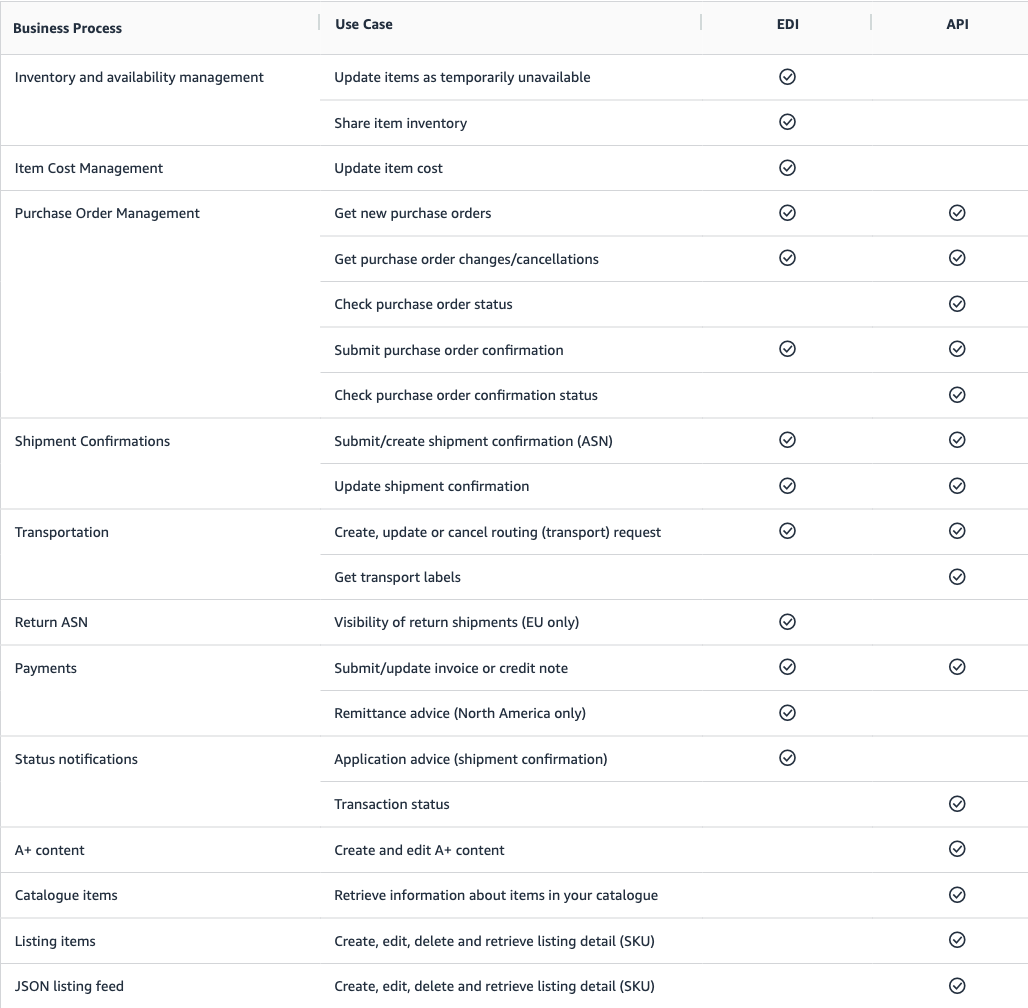
Ask yourself these three questions to decide:
- Do you already have an EDI provider that handles purchase orders, ASNs and invoices reliably? Then there is no reason to switch.
- Are you building a new integration, or do you need data such as reports, remittances and invoice status? Then the API is the better choice.
- Do you manage many vendor accounts or marketplaces? Then a tool that already comes with the API connection often pays off.
How to get Amazon Vendor Central API access
This guide is for vendors who build their own app. Amazon calls this a “private developer”. An agency that builds an app only for you also counts as a private developer. If you use a ready-made tool, skip to the section No development needed.
1. Create a developer profile
- Sign in to Vendor Central.
- In the menu, open Integration › API Integration. The Integration menu now has four entries: Getting Started, EDI Integration, API Integration and Operational analytics.
- Click “Proceed to Developer Profile” (per Amazon’s documentation; if your account is already registered, you see “View profile” instead).
- For data access, choose “Private Developer: I build application(s) that integrate my own company with Amazon Services APIs”.
- Enter the roles you need, your use cases and your security controls.
- Accept the Solution Provider Agreement, the Acceptable Use Policy and the Data Protection Policy.

Amazon then opens a case for your registration. You have five days to answer follow-up questions. Vendor Central also shows the notice “Migrate your developer account to the Solution Provider Portal”, asking you to move your developer account to the Solution Provider Portal (SPP). If you already work in the SPP, your profile is under Settings › Developer Profile.
2. Register your app
Once your profile is approved, register your app in Developer Central. You reach it in the Solution Provider Portal under Develop Apps, or in Vendor Central under Integration › API Integration. Click “Add new app client” and choose the API type, “Vendors” as the audience and the roles your app needs.
You used to need an AWS IAM user. Since October 2, 2023, you don’t. An AWS account, an IAM policy, an ARN or a “Register my application” case are no longer required either.
3. Self-authorize your app and get a refresh token
As a private developer, you authorize your app for your own account yourself, even while the app is still in draft status:
- In Developer Central, open your app’s “Authorize application” page. Amazon’s documentation gives the address
vendorcentral.amazon.com/sellingpartner/developerconsolefor this. - Click “Authorize app”. Amazon shows you a refresh token.
- Your app exchanges the refresh token at
POST https://api.amazon.com/auth/o2/tokenfor an access token. It sends this token with every API call in thex-amz-access-tokenheader.
Each click on “Authorize app” creates a new refresh token; the old ones remain valid. Store the tokens encrypted. For calls with restricted, personal data, your app also needs a Restricted Data Token (RDT).
If you have several vendor groups, you can also self-authorize the app for the other groups, as long as you are an administrator in both accounts. Amazon limits the number of these authorizations. Amazon’s tutorial “Authorize Multiple Vendor Central Accounts with a Single SP-API Application” explains how.
4. Test in the sandbox
Before your app works with real data, test it in the sandbox. For Europe, the sandbox is at https://sandbox.sellingpartnerapi-eu.amazon.com, region eu-west-1. The region only determines where your calls are routed. Amazon offers a static sandbox with fixed responses and a dynamic sandbox that reacts to your input. You create test data with the Sandbox Test Data API. Amazon explains how in its SP-API sandbox guide.
Amazon describes all vendor APIs and their use cases in the Amazon Vendor Central API documentation.
No development needed: vendor data in AMALYTIX
Processing purchase orders in your own system: that is when your own app pays off. If you mainly want to analyze payments, deductions and other data, a tool is enough. AMALYTIX is connected to the SP-API as a public app. You grant access on Amazon’s side through the Website Authorization Workflow. You don’t need your own app, a developer profile or tokens. The section Connecting a tool to Amazon shows the steps.
Back to matching payments: instead of collecting payments and deductions from several pages in Vendor Central, you follow the money in one view. Vendor Finance shows where the money from your invoices goes. The view starts with income and subtracts contractual deductions (such as co-op and allowances) and contestable deductions, for example shortage claims. Amounts you recovered through disputes are added back.
Where is the money going?
Last 90 days
- Income$412,800
- Contractual deductions−$61,900
- Contestable deductions−$18,400
- Recovered+$9,700
- Net$342,200
Recoverable now
Open shortage claims, across your full history
$8,740
You decide which deductions to dispute. More features for vendors are on the page Amazon tool for vendors.
Conclusion
Receiving purchase orders, confirming shipments, submitting invoices: most tasks in Vendor Central now have an API, including listings, reports and Direct Fulfillment. Since 2026, you can also check through the SP-API which invoices have been paid and what the remittance says. For access, you need a developer profile and an app in Developer Central. You no longer need an AWS account.
As a vendor, you sell your goods to Amazon as a supplier and work in Vendor Central. The Vendor API complements your EDI connection. You can use both side by side.
Amazon Vendor Central API FAQ
Do I need an AWS account for the Amazon Vendor API?
No. Since October 2, 2023, the SP-API no longer requires an AWS IAM user or AWS signature. Your app signs in only with tokens from Login with Amazon.
Does the Vendor API cost anything?
No, Amazon currently charges no fees for the SP-API. Your costs are for building and running your app, or for a tool that handles the connection.
Can I get remittances by API?
Yes. Since September 30, 2026, the Finance Remittance API does this. It returns the same data as Vendor Central under Payments › Remittance: payments, deductions, vendor returns and advertising costs.
EDI or API: which is better for vendors?
If your EDI connection runs reliably, you can keep it. For new integrations and for data such as reports, remittances and invoice status, the API is the better choice. You can use both side by side.
Who can build a private vendor app?
The vendor itself, or an agency or IT company that builds the app only for this vendor. Amazon treats both as private developers. Anyone who offers an app to many vendors is a public developer. Public developers register in the Solution Provider Portal with identity verification and need a public website.
Where can I find the Vendor Central API documentation?
Amazon’s developer documentation is at developer-docs.amazon. Start with the page on the SP-API vendor use cases. It is linked above in the sandbox section.
Subscribe to Newsletter
Get the latest Amazon tips and updates delivered to your inbox.
By subscribing you agree to our Privacy Policy .
