Alexa for Shopping (formerly Amazon Rufus) 2026: How Amazon's AI Assistant Recommends Products

Trutz Fries

Alexa for Shopping (formerly Amazon Rufus) is Amazon’s own AI shopping assistant. It answers product questions, supports buying decisions, and increasingly influences which products shoppers actually see.
For sellers and vendors, this matters because Alexa for Shopping is not just another interface layer. It is changing the product recommendation logic on Amazon.
Traditional Amazon search is still heavily driven by typed keywords. The assistant works differently. It uses a language model to interpret intent, add context, and generate its own search behavior from that context.
That is why it is not enough to treat this shopping AI as “just a chatbot.” If you want to understand visibility on Amazon, you need to know where it appears, what it can already do, which signals it uses, and how those signals turn into product recommendations.
At AMALYTIX, we have tracked this assistant continuously since the first visible Rufus rollouts. We test new features, compare outputs, analyze recommendation patterns, and monitor how behavior changes over time.
This guide brings that work together around one core question: How does Alexa for Shopping recommend products, and what does that mean for listing optimization?
What you will learn in this guide
In this guide, you will learn:
- why Alexa for Shopping is strategically important for Amazon,
- how the assistant is embedded across the customer journey,
- which capabilities Alexa for Shopping already has today,
- which data sources the shopping AI relies on,
- which optimization levers sellers and vendors should prioritize now.
Why Alexa for Shopping is strategically important for Amazon
Alexa for Shopping is Amazon’s response to a broader shift, not just a feature launch. For years, Amazon was the default starting point for product discovery in many categories.
That position is under pressure because AI systems like ChatGPT, Gemini, and Claude have become a first stop for many users, including for product research.
For Amazon, this is strategically sensitive. If product discovery starts outside Amazon, the marketplace loses part of its traditional gatekeeper role.
The main customer interface then shifts from a marketplace page to an AI interface. Amazon’s AI shopping assistant is the answer to that exact shift.
That also explains Amazon’s rollout behavior: Alexa for Shopping is not treated as a side feature. Amazon wants it to capture users early in research, guide selection, and keep purchase intent inside the Amazon ecosystem.
Alexa for Shopping in practice: touchpoints and capabilities
The classic entry point is still the Alexa for Shopping chat interface. But for sellers and vendors, the real story is the growing set of touchpoints and workflows where the assistant now appears across search, product detail pages, and cart.
Touchpoints across the customer journey
Alexa for Shopping is not limited to a single entry point. Amazon is building it as a distributed system across many customer journey moments, not as an isolated chat UI.
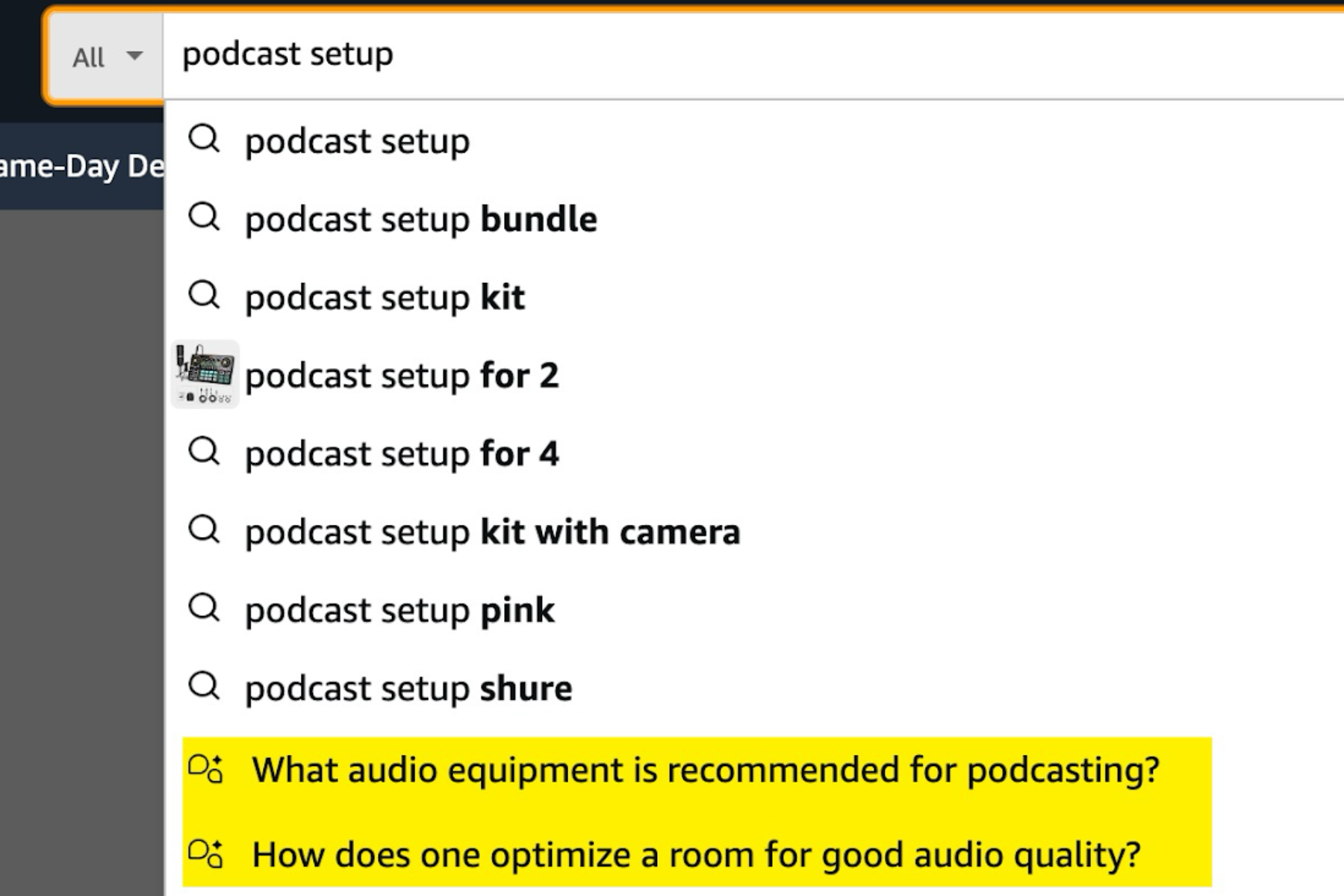
One entry point already appears in the desktop search bar: before users even hit the SERP, Amazon can surface Alexa prompts based on the query.
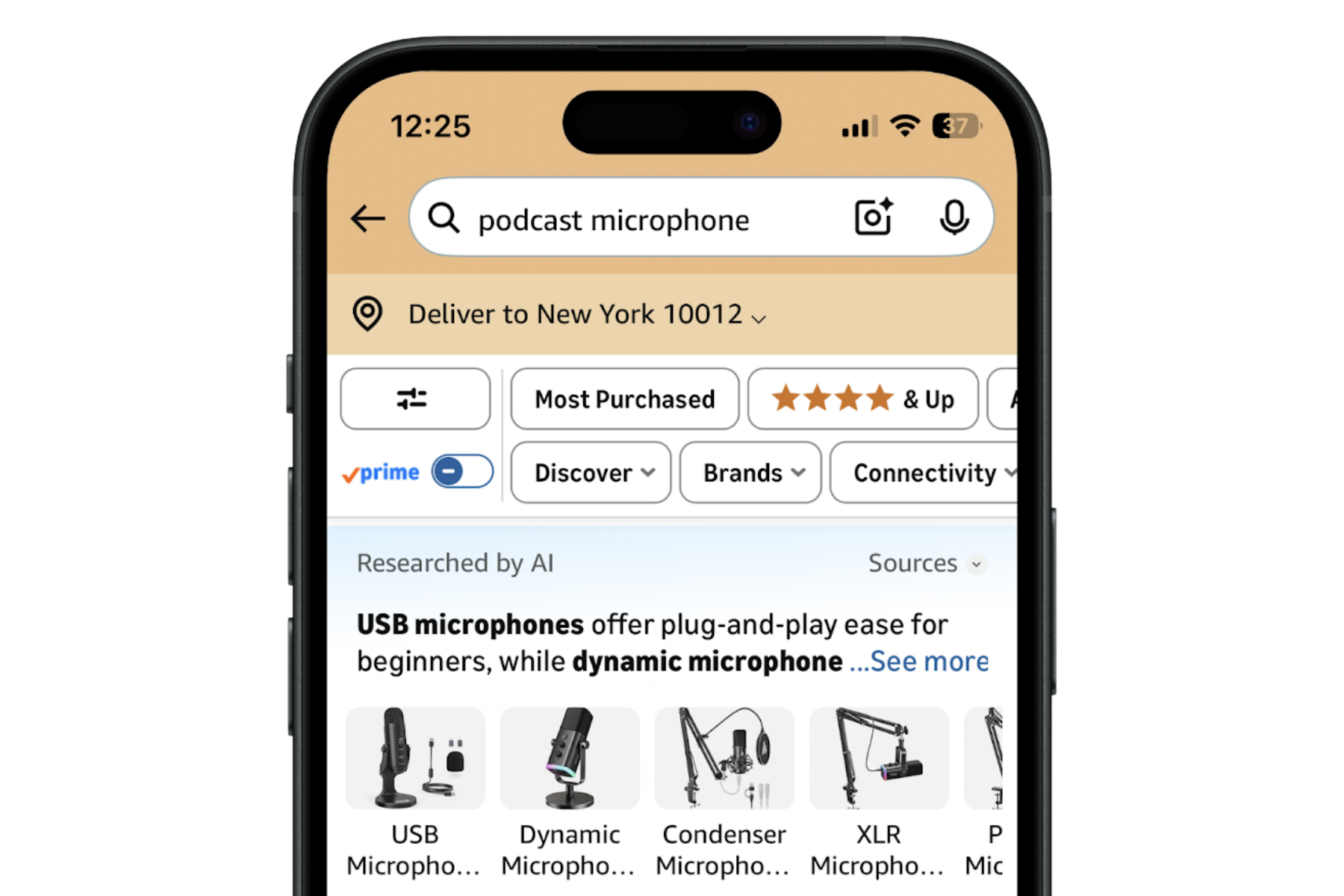
A core SERP touchpoint is Researched by AI. Conceptually, this module is close to an AI Overview in traditional search engines: it condenses the results page into a generative decision layer instead of showing only isolated listings.
To do this, Amazon auto-generates prompts from the query and visible products, so shoppers can continue without typing. For sellers and vendors, this condensation matters because it shapes which product arguments become visible early in the decision process.
At the core, the workflow is: the assistant interprets the query, analyzes displayed products, identifies relevant buying criteria, and turns that into a contextual decision guide.
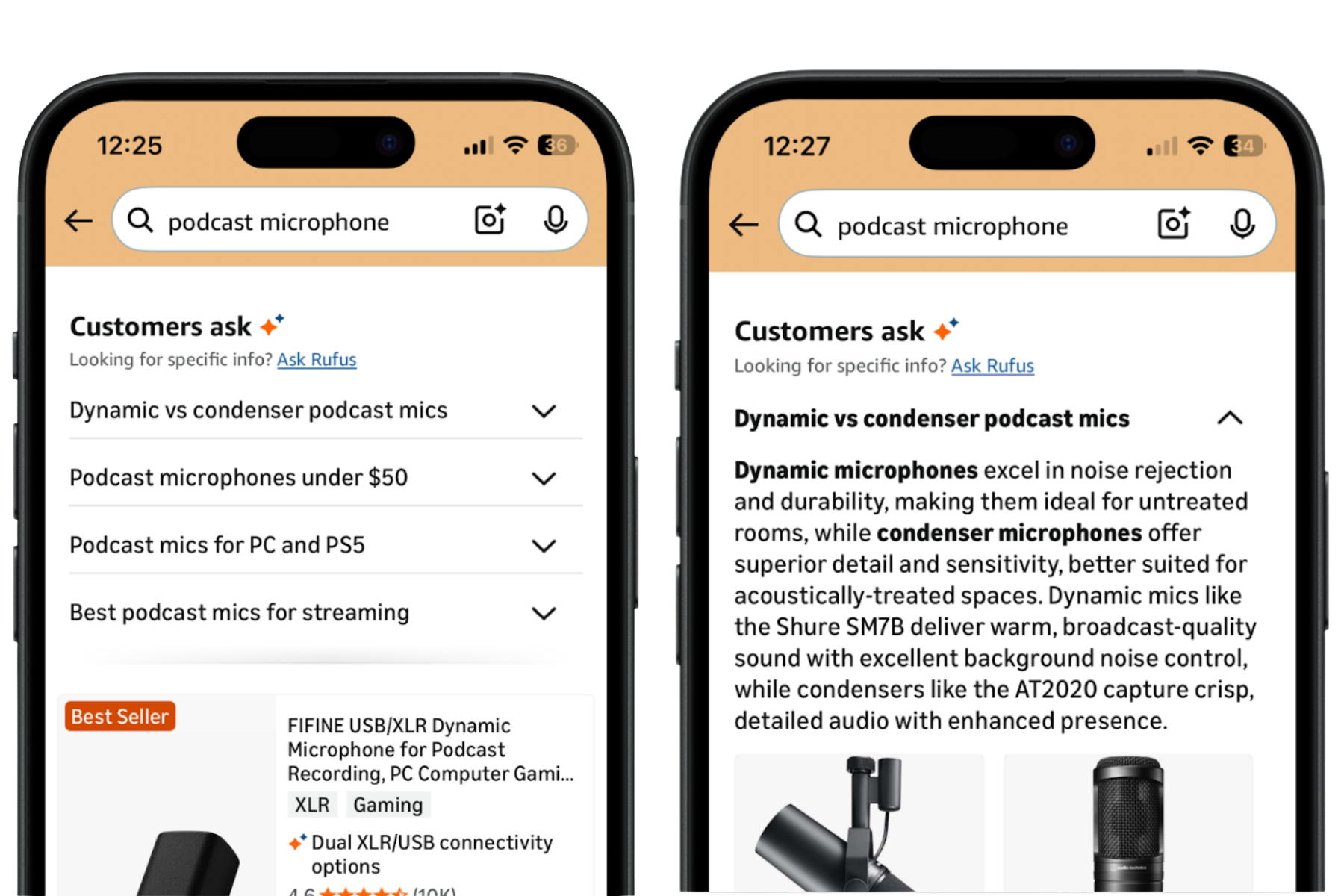
Amazon now also surfaces a Customers Ask module in SERP with a generated short summary and a matching product carousel.
The prompts shown there appear to be the ones most frequently clicked in the Alexa flow. In other words, these prompts originate in the assistant dialog and are then promoted into standard search results.
For sellers and vendors, this is strategically important: what users click most in the Alexa chat can become visible as prompts in search. Optimization is therefore shifting to a new layer. It is no longer only about keyword coverage, but also about the exact questions and phrasings that drive interaction in the assistant. Brands that appear in these high-click prompts can gain additional SERP visibility.
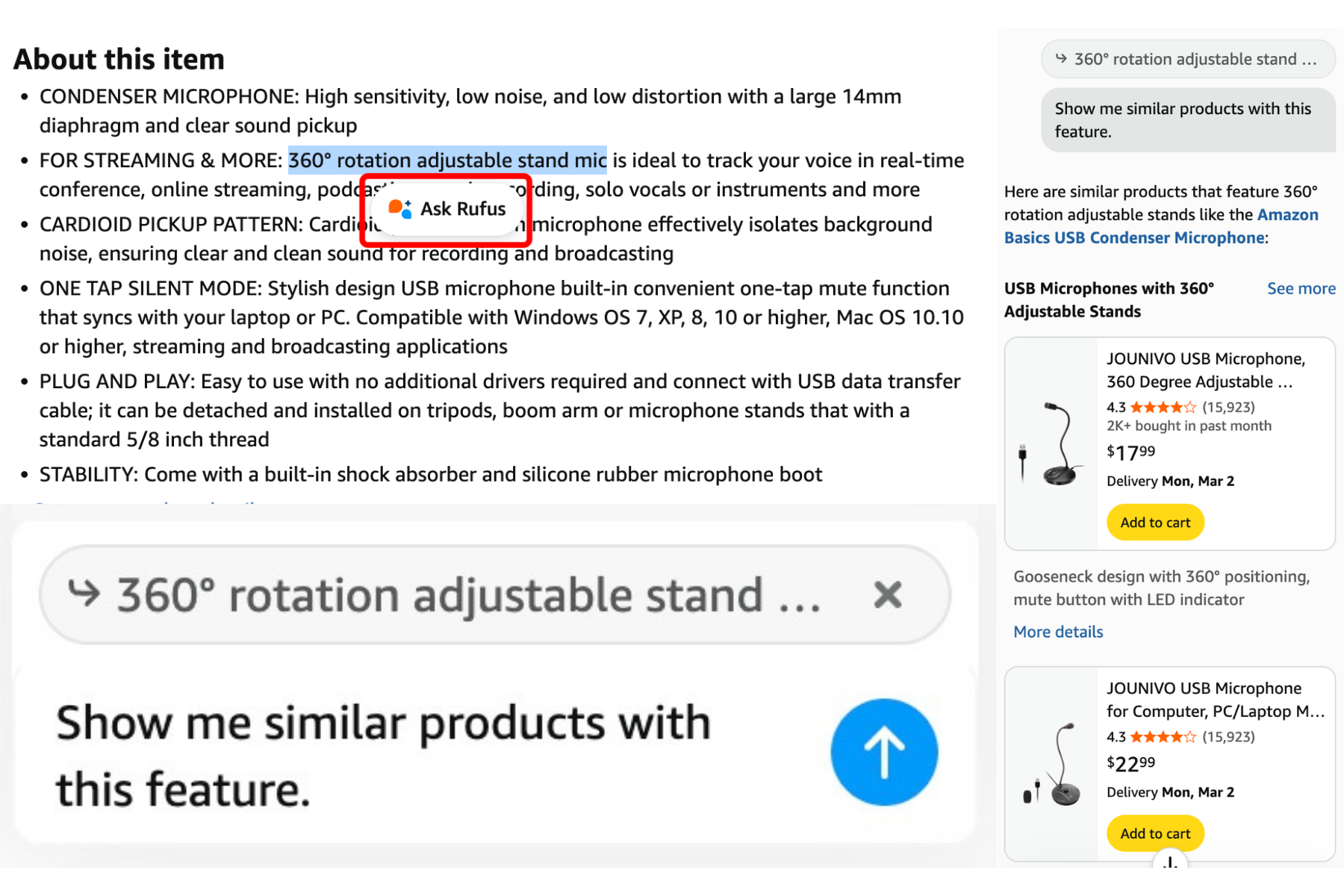
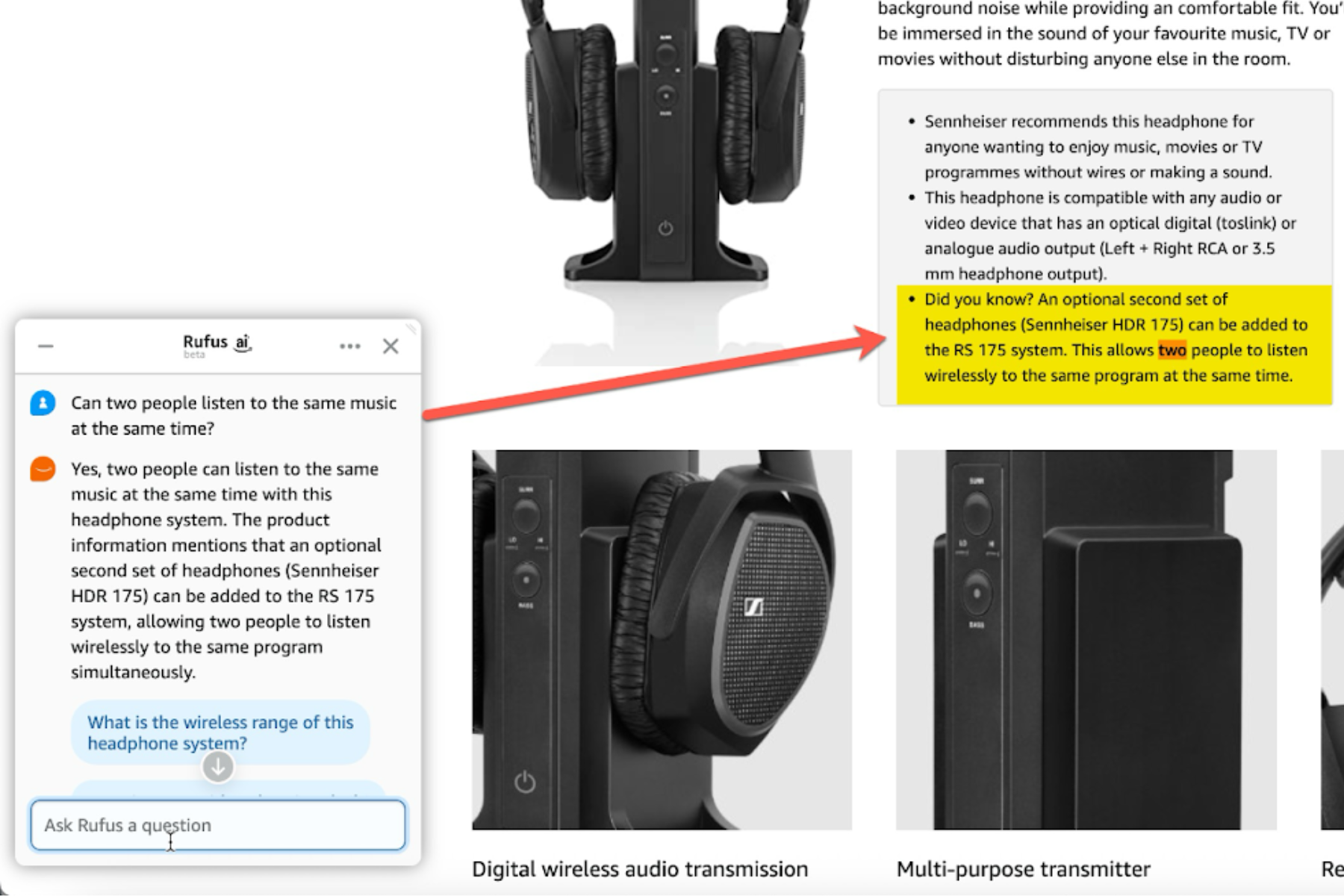
On product detail pages, desktop users can highlight text in a listing and click the pop-up Ask Alexa button. The assistant appends highlighted text as context in the chat, useful for direct claim validation.
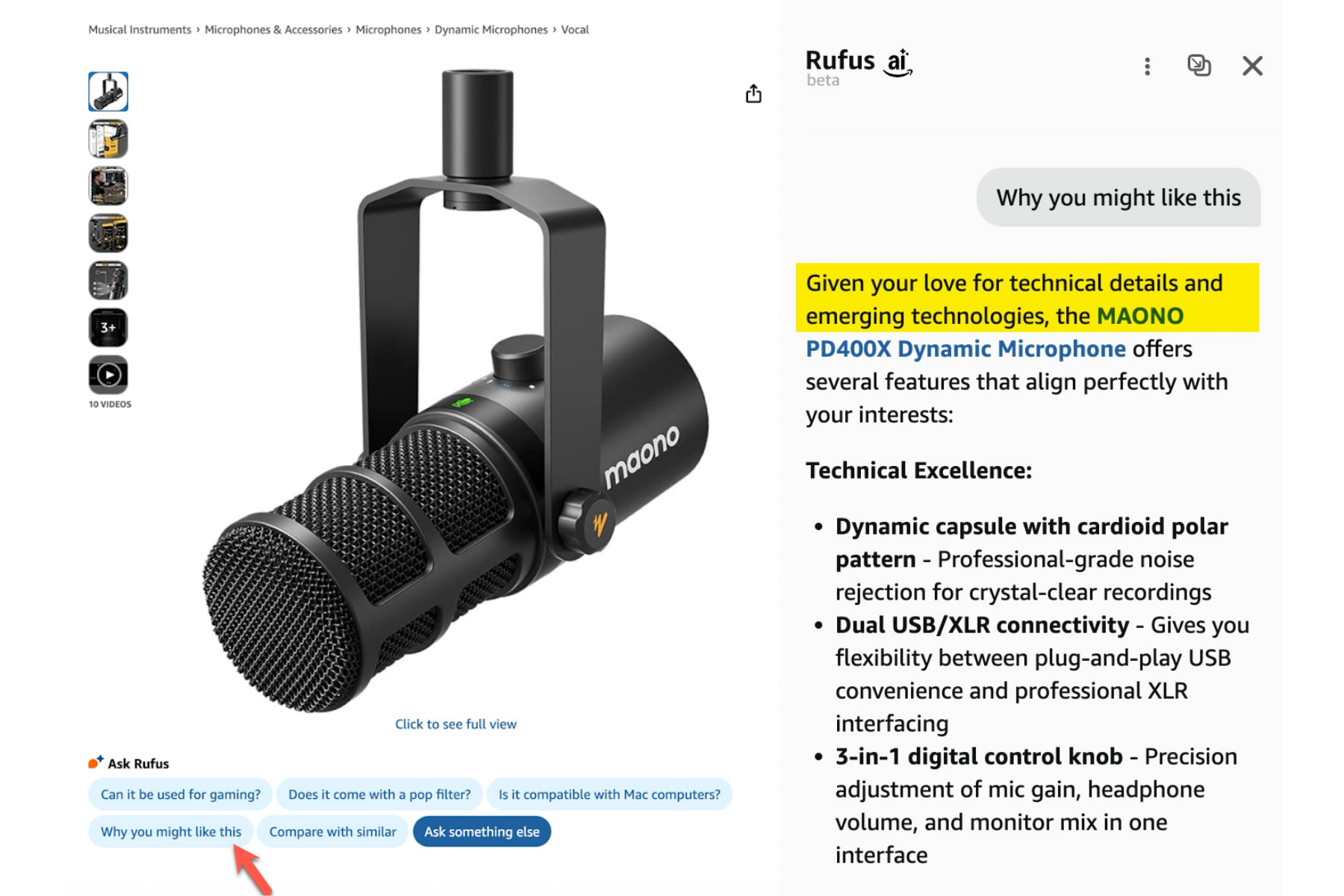
Another PDP touchpoint is Why you might like this. On selected detail pages, users get a personalized explanation of why a product may fit their shopping preferences.
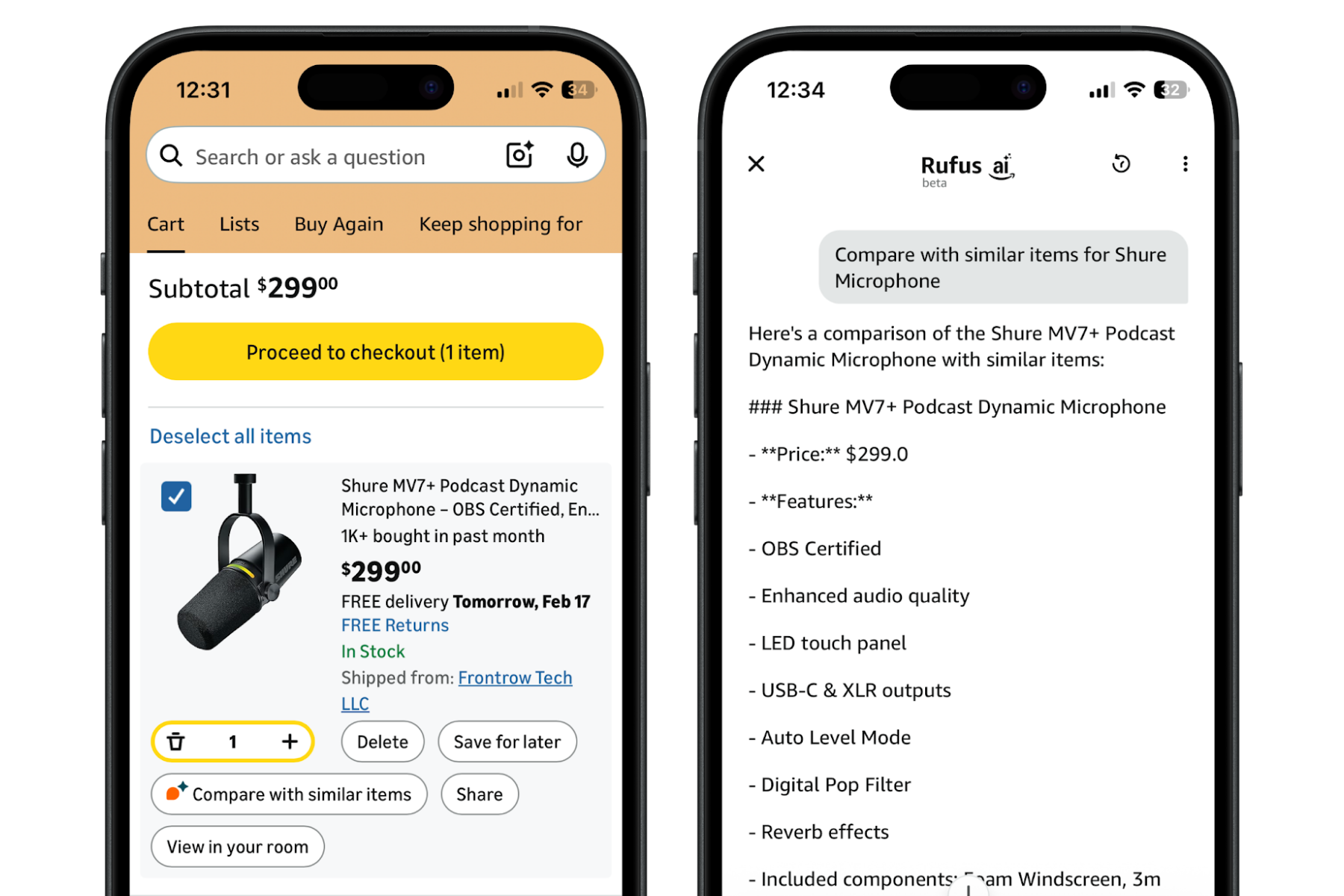
In cart, users can launch the assistant via Compare with similar items to run a direct product comparison close to checkout.
For brands, this is key: the shopping AI is not only active when someone wants to “chat.” Amazon is integrating it into search and purchase flows where decisions are already happening.
Advanced features and agentic workflows
One major feature jump is Custom Guide, which starts a full research workflow in the Alexa chat.
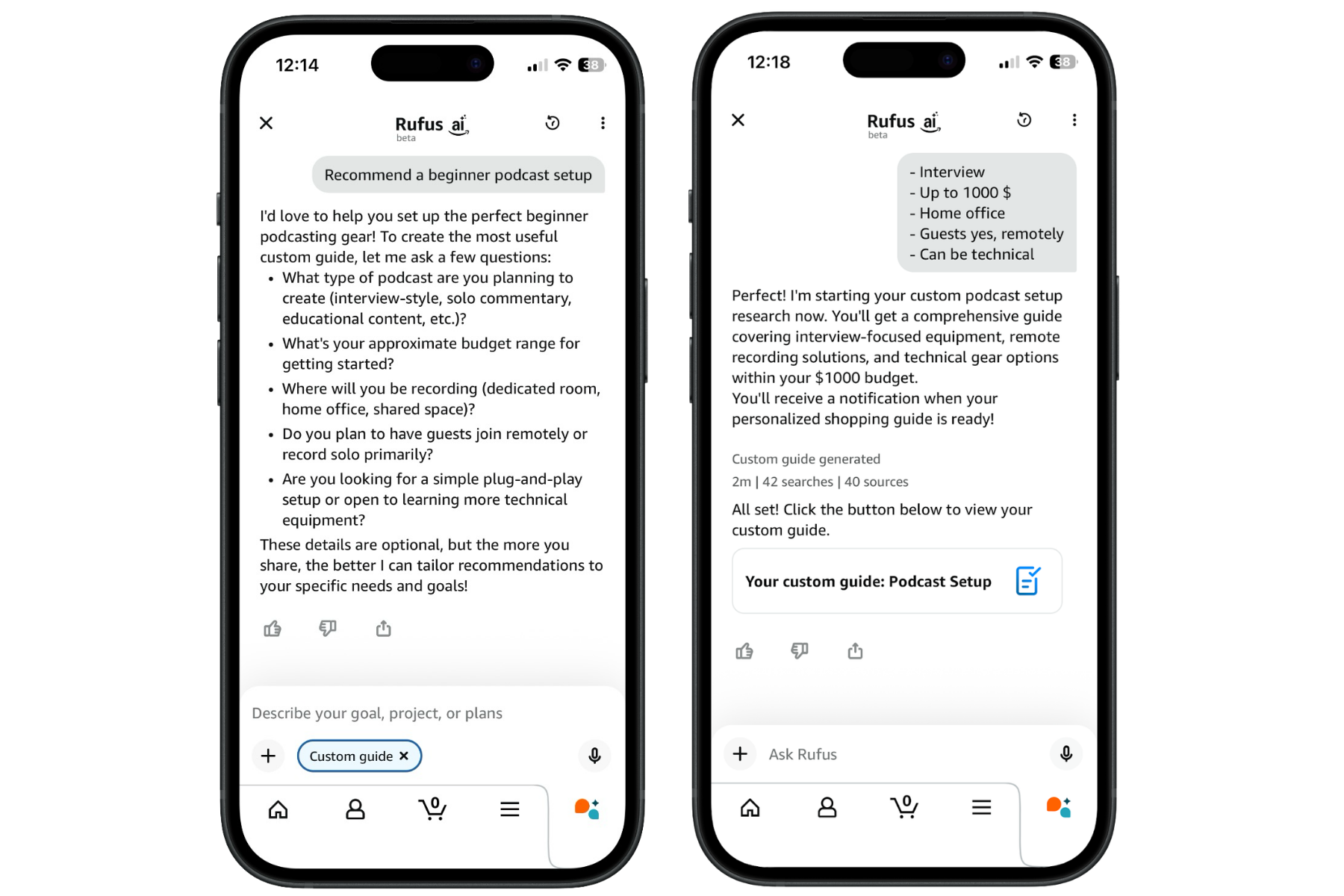
Within a single request, the assistant can run multiple sub-searches, combine Amazon catalog data with external editorial sources, and weigh goals, budget, constraints, and preferences while users continue shopping.
The output is a structured, multi-step buying guide with direct purchase options. In practice, it feels like a personalized expert article with built-in add-to-cart pathways.
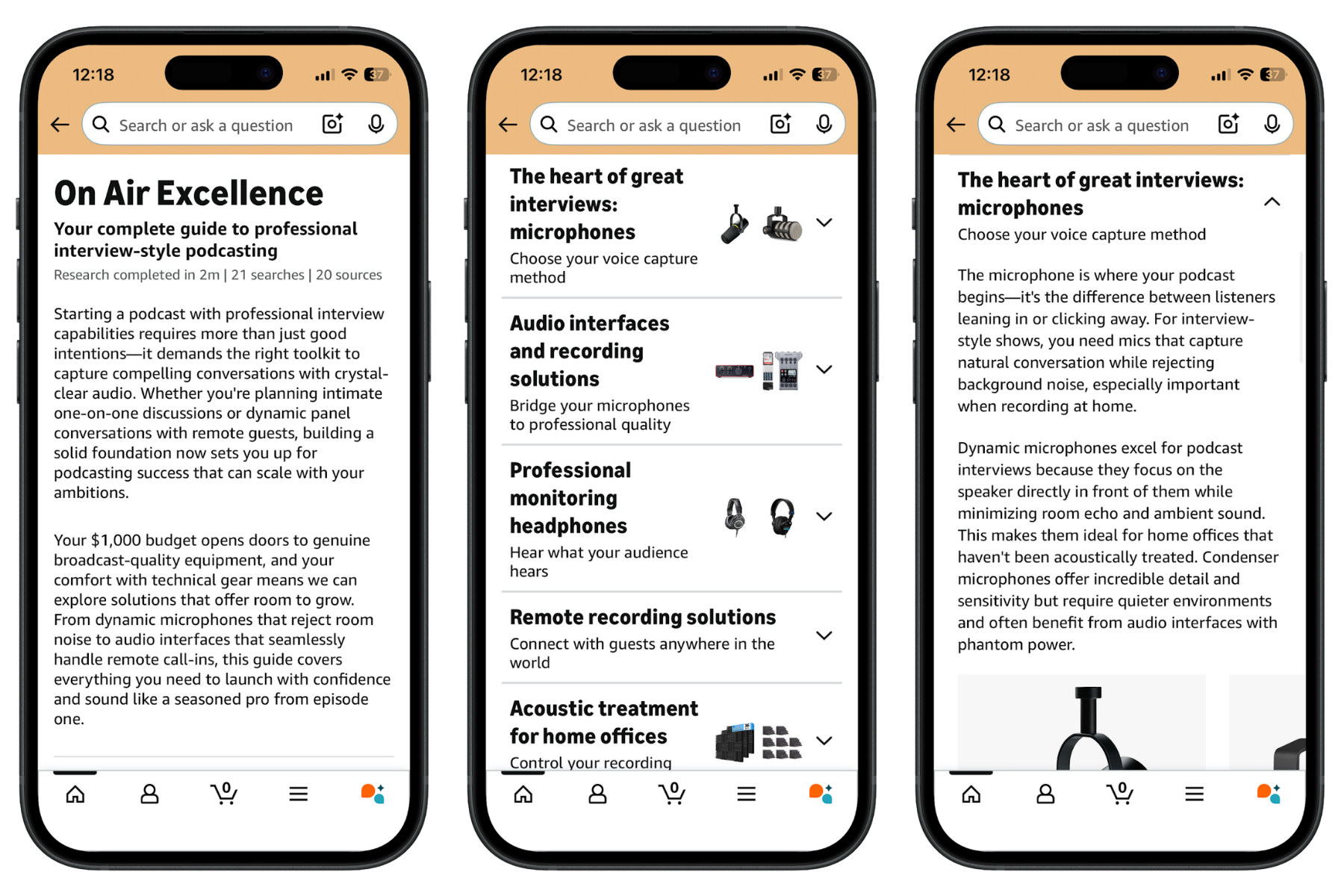
This means product selection is no longer based only on rank. It increasingly reflects use-case fit, context of use, compatibility, editorial consensus, budget segment, and bundle logic. Competition moves from SERP rank into curated AI buying flows.
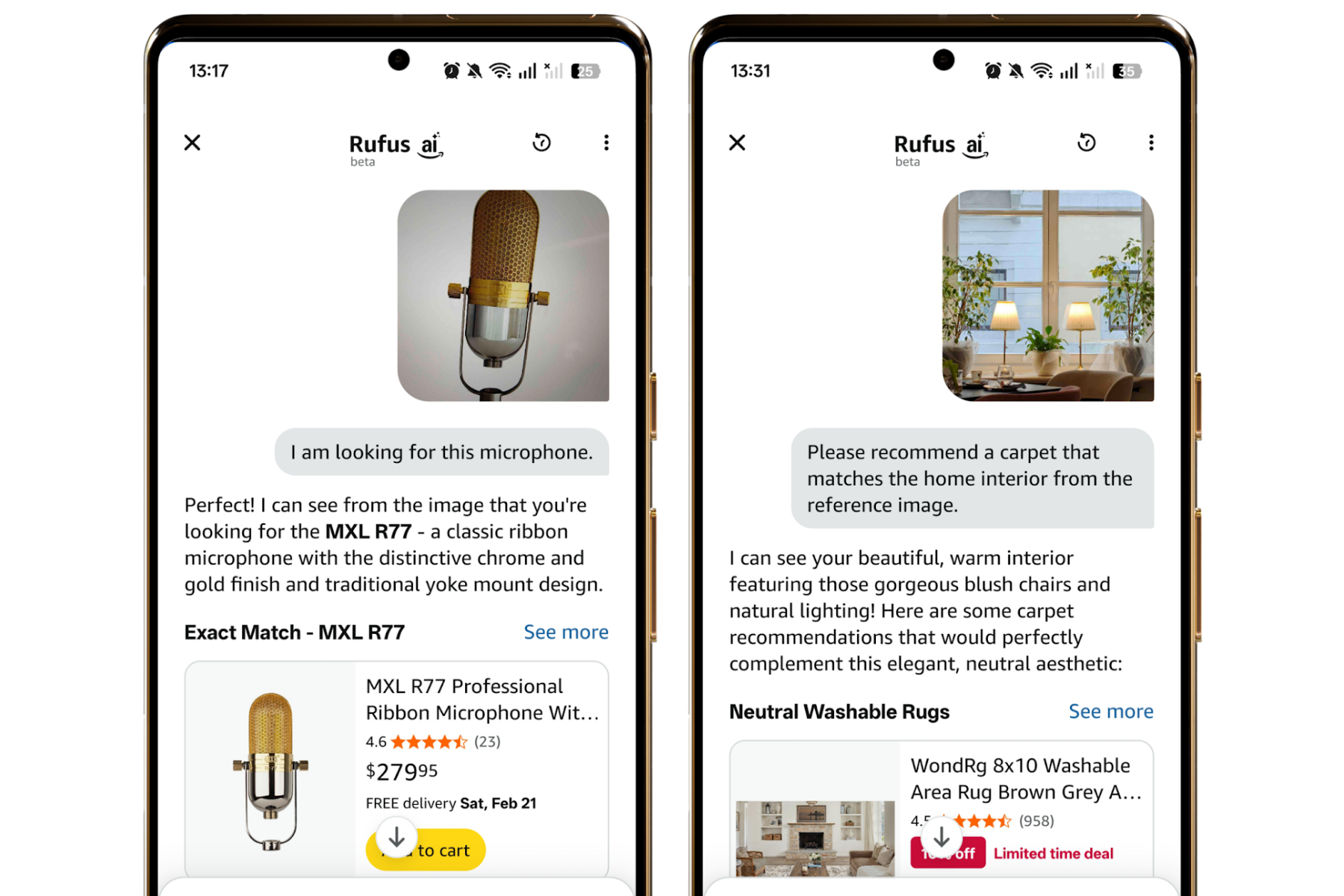
Alexa for Shopping also supports visual search entry. Users can upload or take a photo, and the image becomes the search input.
The assistant can identify products in scene context, style characteristics, materials, proportions, and visual relationships. It then finds identical or visually similar products on Amazon, surfaces contextual alternatives, or processes physical shopping lists.
With Shop direct or Shop other stores directly, Alexa for Shopping can include external storefront results and route users out for checkout.
That should be distinguished from Buy for Me. In that model, Amazon can act as an agent that executes checkout in external stores on the user’s behalf.
Reports indicate that, in isolated cases, Shopify stores were included without active brand opt-in, and some merchants only noticed through incoming Amazon-originated orders.
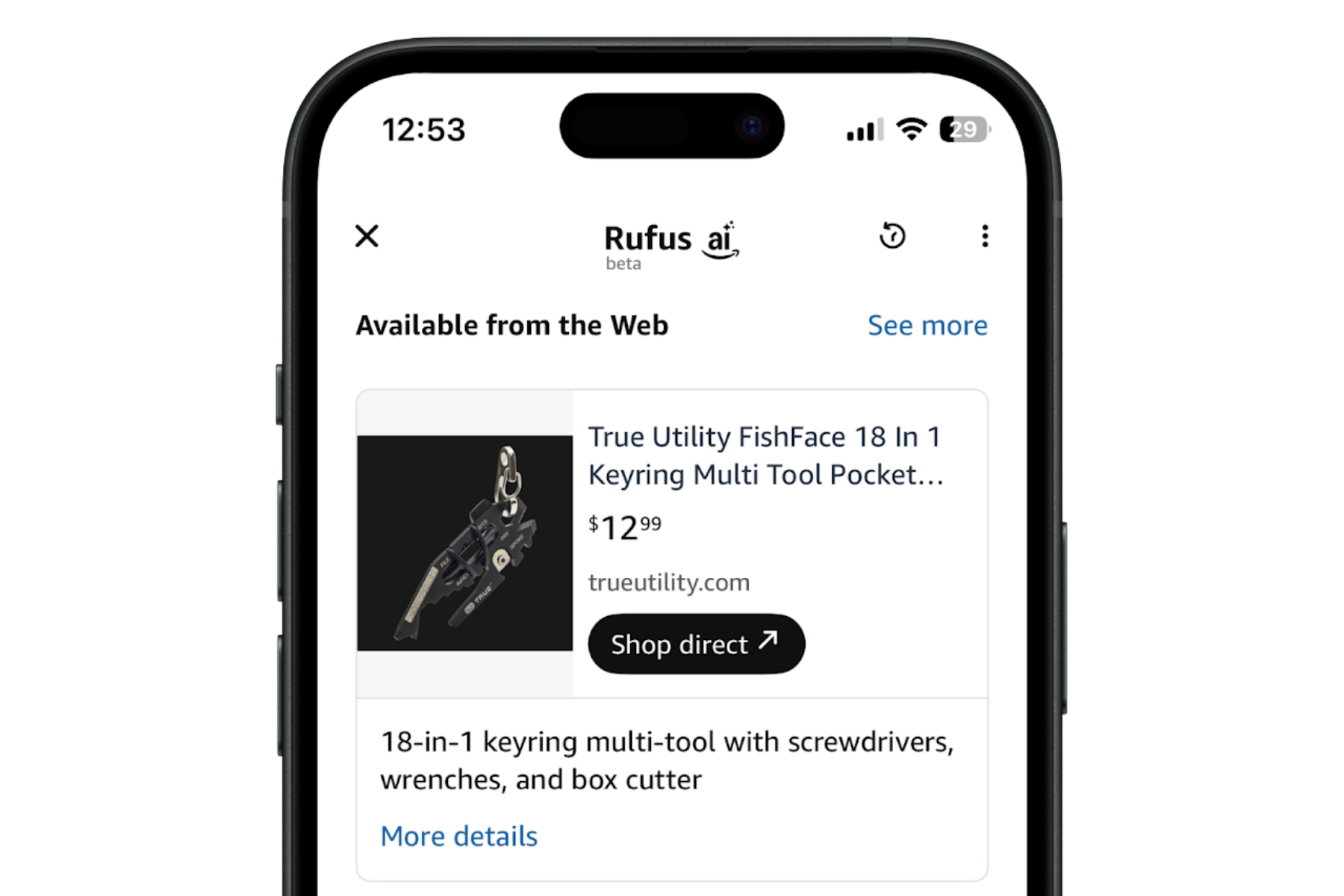
Strategically, this shows where agentic commerce is heading: beyond platform boundaries, with Amazon positioning itself as an intermediary between consumers and independent merchants.
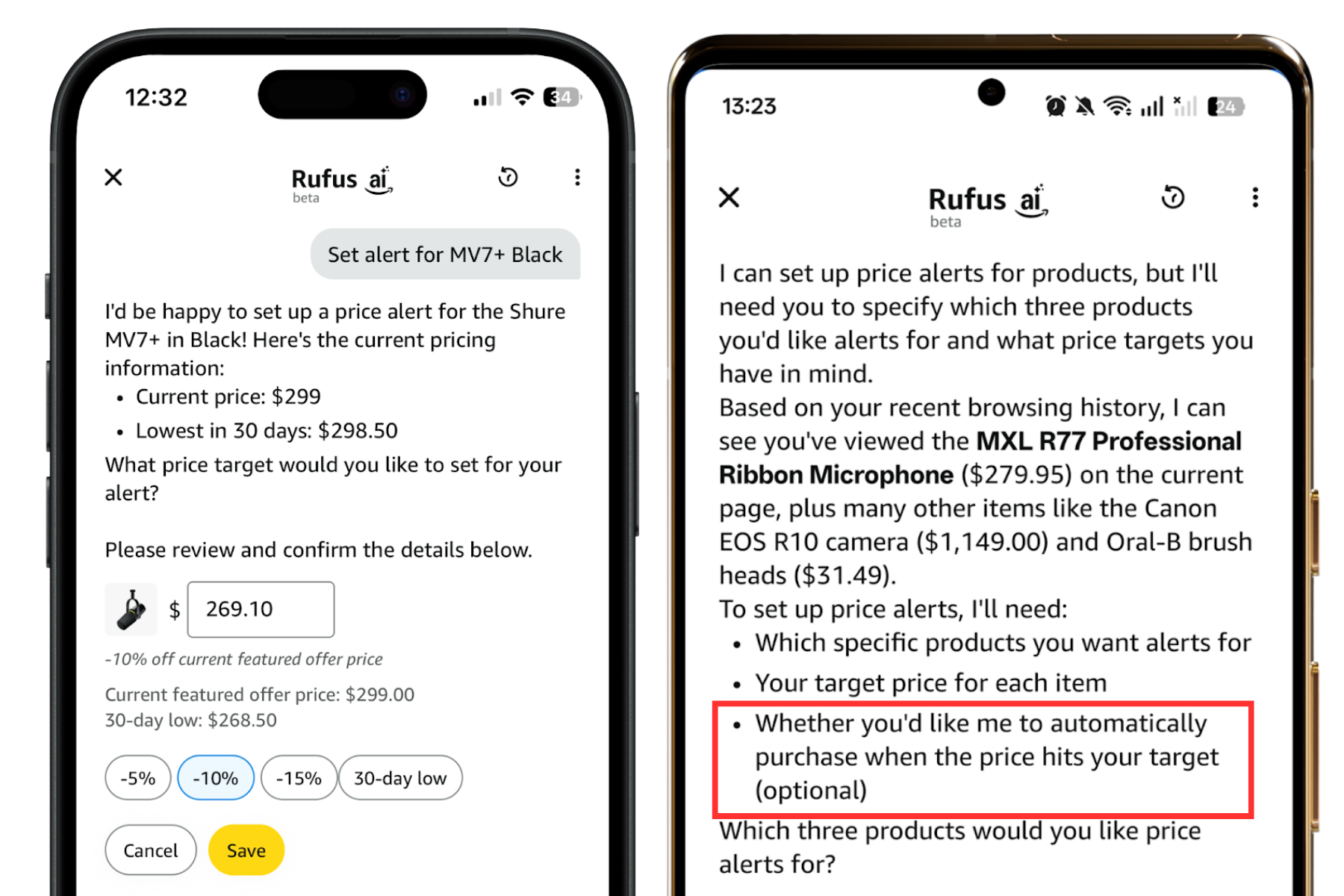
Another practical feature in the Alexa flow is price alerts.
The workflow is straightforward: users can ask in the Alexa chat to create a price alert for a product.
The assistant prepares the alert in flow. Today, users still need to manually confirm or save it.
Once active, Amazon notifies users when prices or discounts change.
Which data sources Alexa for Shopping uses
To understand Alexa for Shopping, UI observations are not enough. At its core, it behaves like a typical AI agent system: language model behavior, system instructions, contextual memory, and retrieval tools work together.
Four data layers interact:
- user data
- product data
- language model knowledge
- external web sources
That combination explains why the assistant can do much more than classic keyword retrieval.
User signals that shape Alexa for Shopping recommendations
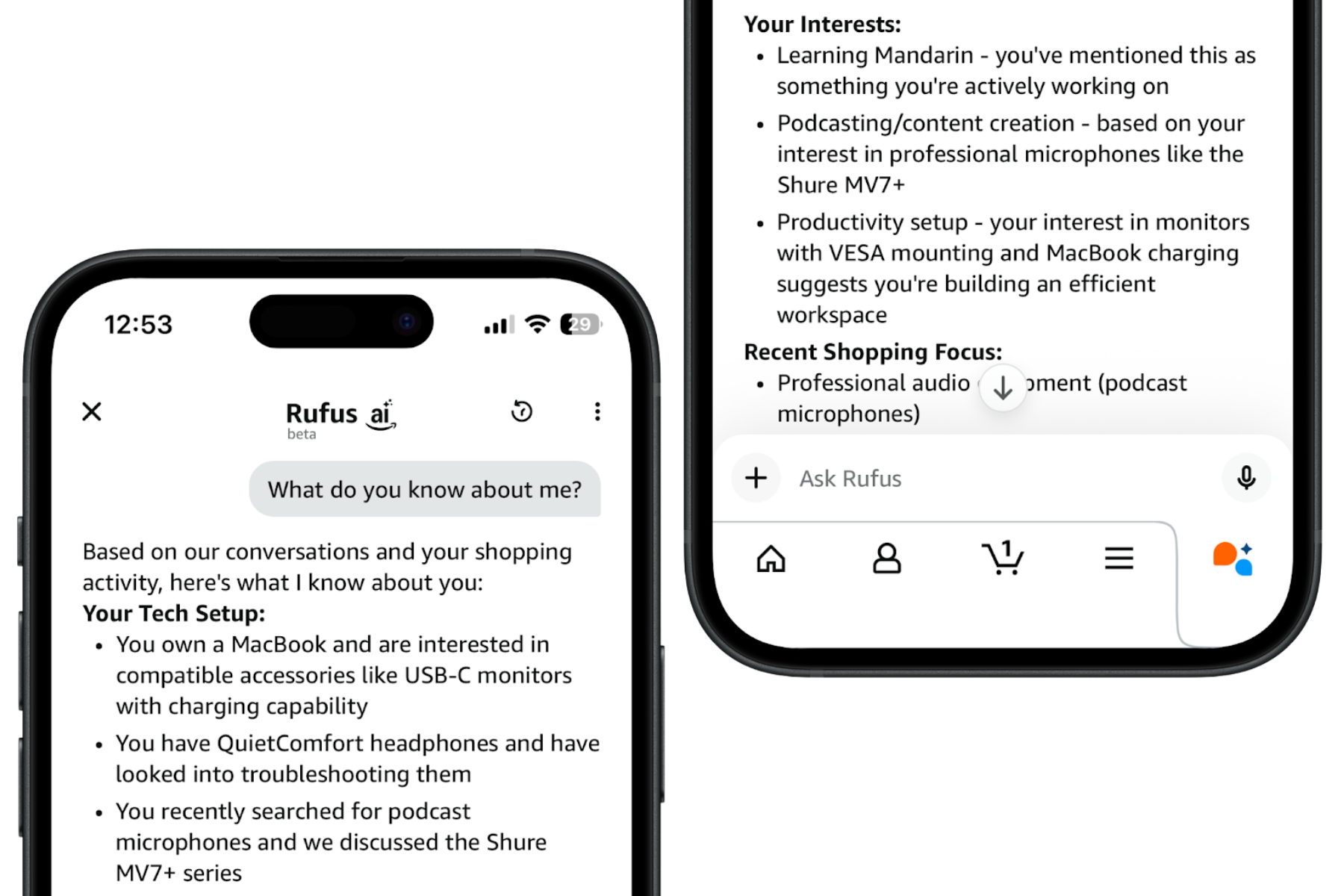
Alexa for Shopping can access multiple user signals relevant for recommendations, including prior purchases, viewed products, wishlist behavior, account context, and chat history.
Chat history is especially important because the assistant does not reason one prompt at a time only. It can carry preference patterns over conversation history.
If users repeatedly ask for certain product types or express clear preferences, those signals can influence later recommendations. The result is not just semantic relevance, but user-specific relevance.
The assistant can summarize user profiles, for example a mix of premium-audio interest, tech focus, and willingness to buy in higher price tiers. That level of personalization goes well beyond traditional Amazon search.
Product data Alexa for Shopping appears to prioritize
On the product side, access depth is high. Alexa for Shopping can process titles, bullets, and descriptions, technical specs and variants, price and shipping information, plus reviews, Q&A, and rating context.
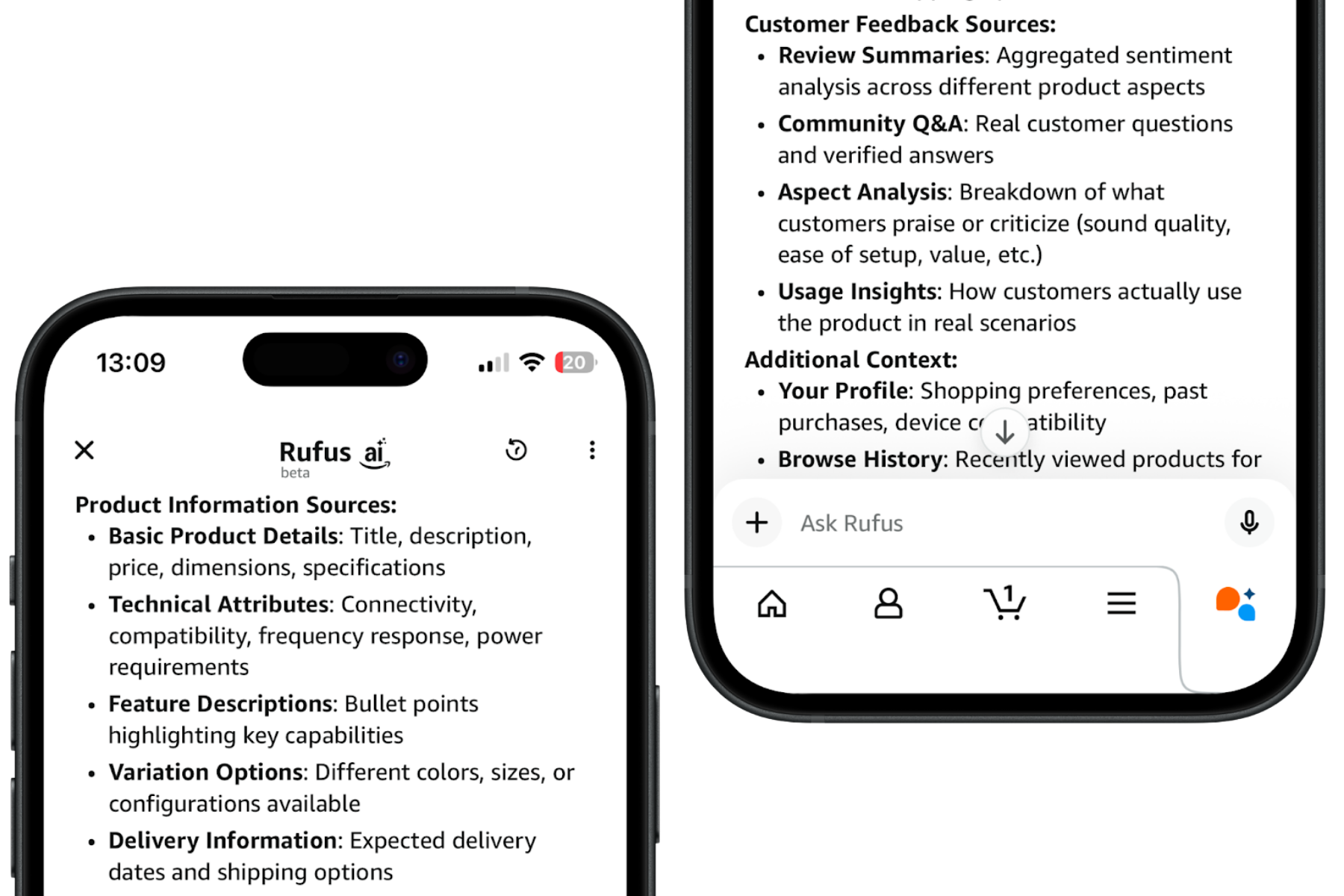
That means the system sees not only what brands claim, but also how customers evaluate the product.
One major source is A+ Content, including Premium A+ and Brand Story. If teams treat A+ as a visual canvas only, they leave value on the table. For Alexa for Shopping, A+ is also a knowledge source.
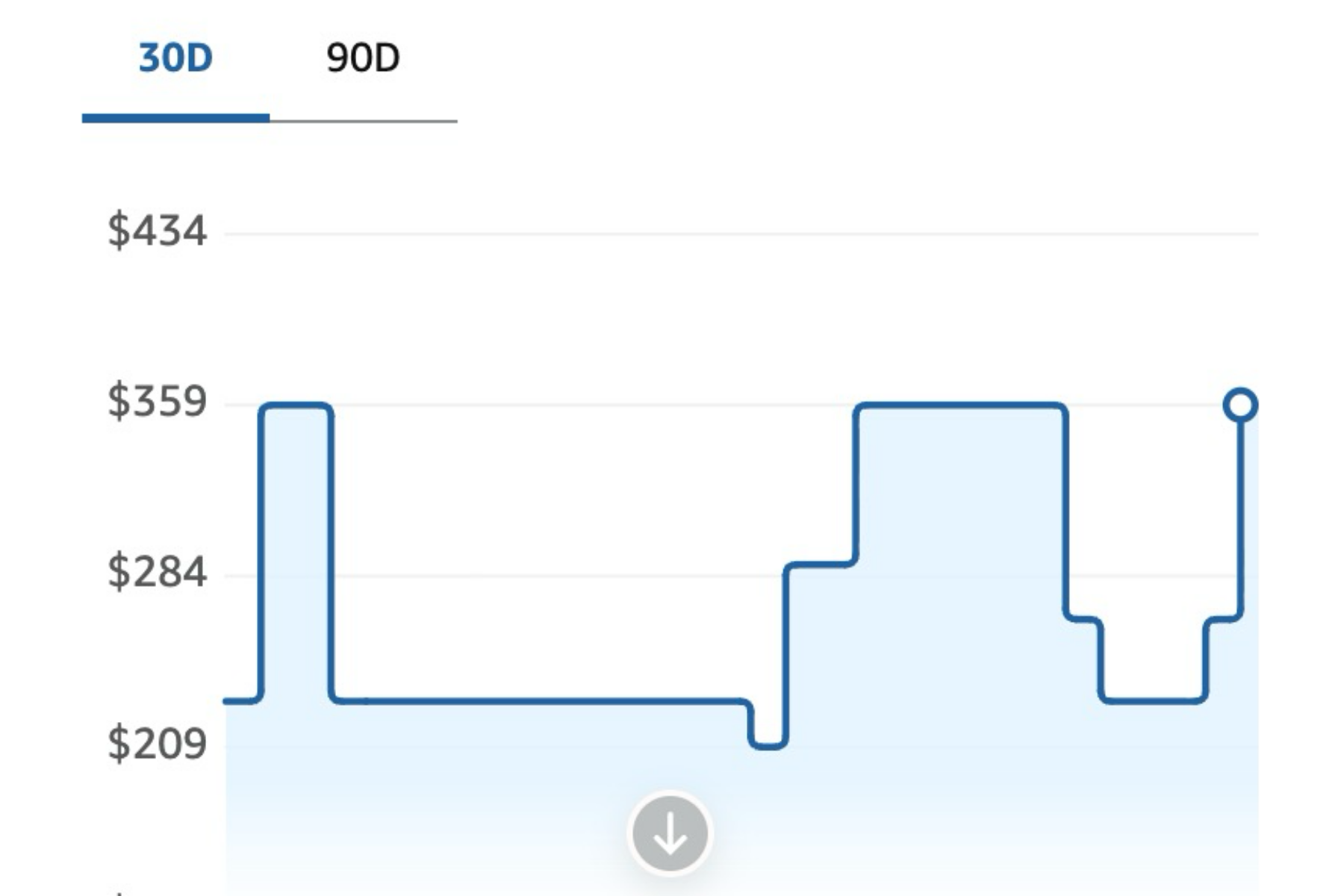
Price history matters too. It can incorporate trend and pricing level, not only current price.
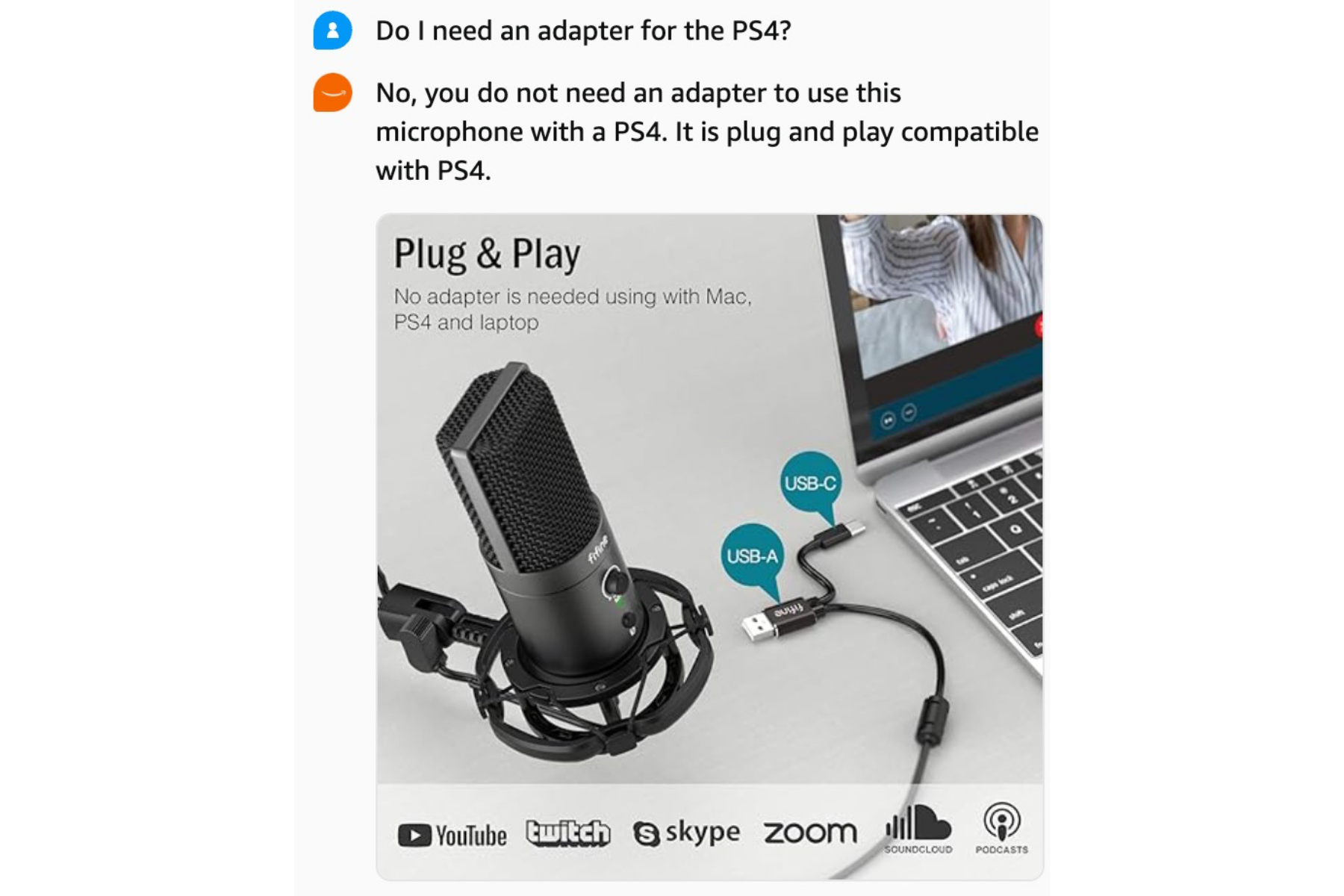
The same applies to images: pure visuals are less useful than assets that combine visuals with clearly readable text, consistent with best practices for Amazon images.
When Alexa for Shopping uses external web sources
Alexa for Shopping does not operate only within Amazon’s own dataset. External search seems especially likely for high-consideration purchases, complex technical products, safety-critical use cases, performance-dependent equipment, and newly emerging or niche categories with limited review depth. The assistant can also use external search for time-sensitive questions, such as “What is the newest iPhone model?”
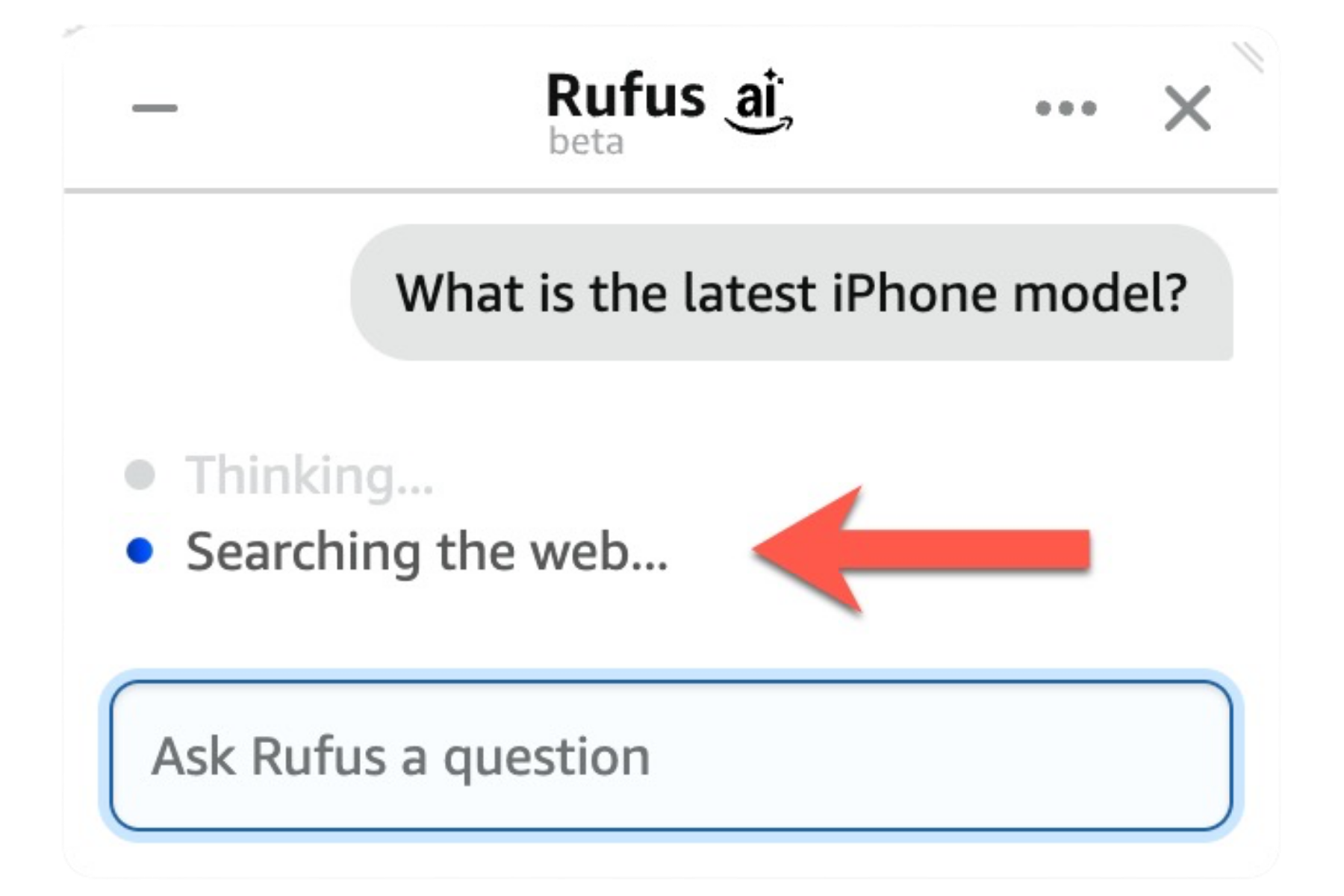
The takeaway: the assistant is not purely catalog-bound. It can expand its knowledge space when freshness or context requires it.
How Alexa for Shopping recommends products
The most important layer is recommendation logic. This is where Alexa for Shopping clearly diverges from standard Amazon search.
In classic search, ranking starts from the user-entered query. The assistant actively reformulates part of the search process and combines multiple signal classes.
Typical inputs include known brands and models, feature-oriented concepts, category hints, and user-level context signals.
That is why its result sets often differ from standard SERP output.
The model turns broad questions into specific product search structures. “Recommend podcast microphones” is not treated as one generic query, but as a multi-signal, model-guided research process.
In categories with strong price-quality expectations, this behavior is even clearer. Alexa for Shopping not only parses terms, it often maps intent into an expected market segment.
So the same prompt can lead to different recommendations depending on user context.
In practice, multiple parameters shape retrieval: price preference filters, premium intent captured through specific brand names instead of generic terms, additional flags such as popularity or deals, and keyword patterns spanning product-specific, feature-based, and category-level terms.
Hygiene factors are also visible:
- products below 4.0 stars are typically not recommended,
- availability acts as a hard filter,
- bestseller or premium segments are prioritized depending on the implied goal.
Overall, the assistant recommends products by combining language-model reasoning, user signals, product data, and generated search parameters.
What sellers and vendors should optimize now
If Alexa for Shopping actively reshapes product discovery, traditional optimization mechanics alone are no longer enough. That was already true for Amazon Rufus optimization. Keywords still matter, but they are only one layer.
1) Prioritize the right ASINs first
Start with products that carry the highest visibility risk: content gaps, weak ratings, and incomplete data fields.
2) Use all content fields as one system
Treat title, bullets, description, and A+ Content as connected semantic data sources. Complete listings gain advantage because complex retrieval by Alexa for Shopping needs many information anchors, which aligns with Amazon product listing optimization.
3) Make use cases explicit
A strong listing should not only list features. It should clearly communicate usage scenarios, target users, and concrete problems solved, from Amazon product titles to Amazon bullet points and Amazon product descriptions.
4) Increase information density in A+ and images
Many modules look visually strong but remain text-light. For Alexa for Shopping, structured and readable information carries more weight. This includes infographics: legible text can materially improve semantic utility.
5) Manage rating hygiene consistently
If products below 4.0 stars are excluded from recommendations, review management is not just a conversion topic, but also a discovery lever. Programs like Amazon Vine can support this.
6) Build category relevance over time
Listing optimization alone is not enough. External mentions, brand signals, and contextual category content also help establish long-term relevance.
Bonus: use SERP modules as a research input
For your core keywords, actively analyze the Researched by AI and Customers Ask modules. They reveal which questions, comparison criteria, and information signals the assistant currently treats as important. Use that insight to close listing gaps quickly.
Paid as an additional visibility lever for Alexa for Shopping
Another lever is AI-generated Sponsored Prompts in Sponsored Brands and Sponsored Products. Prompts are derived from real user questions and connected to relevant products.
For advertisers, a key limitation remains: prompt control is limited. You can usually disable prompts, but not freely author them. That makes listing content an indirect ad-copy input.
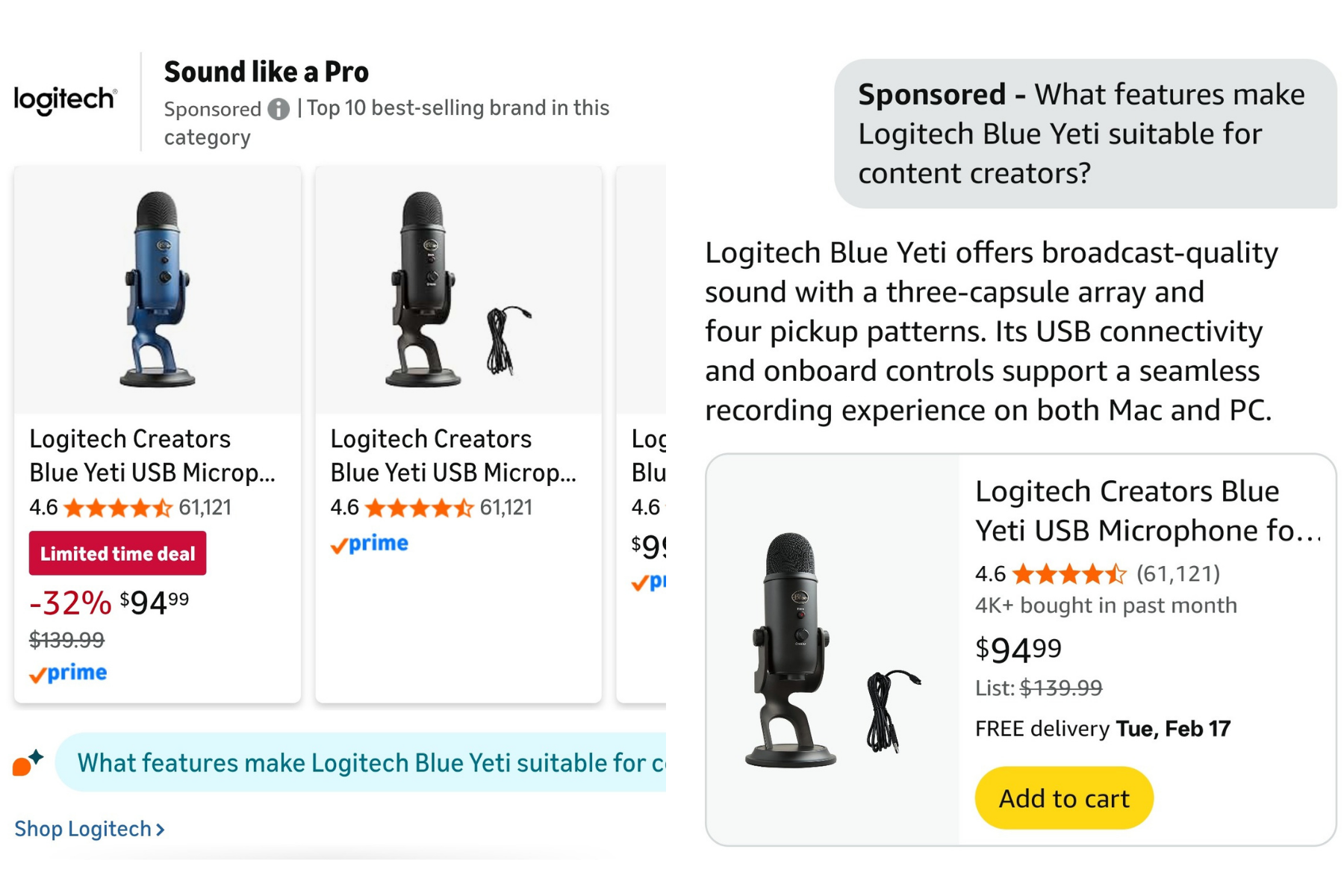
Common prompt patterns include:
Why choose [Brand] [product category]?(comparison-oriented)Does [Brand] have a [product] with [feature]?(feature-specific)
In many cases, those prompts appear to drive stronger interaction and clearer purchase intent than standard ad formats.
Operationally, a repeatable workflow helps: download the Sponsored Products Prompts Report, review generated questions, disable mismatched prompts, and reinforce useful prompts with consistent PDP messaging.
TL;DR for sellers and vendors
These points matter most in practice:
- Alexa for Shopping is a new discovery layer, not just a chat channel (formerly Rufus).
- Alexa for Shopping appears across many touchpoints: search bar, SERP, PDP, and cart.
- Visibility is shifting from pure keyword matching to semantic fit.
- Complete listings across title, bullets, description, and A+ become more important.
- Use-case clarity and utility context increase recommendation relevance.
- Rating hygiene becomes a direct visibility factor.
- Shop direct and Buy for Me differ: external redirection vs. Amazon-led agentic checkout.
- Paid supports organic work: AI-generated Sponsored Prompts are an additional Alexa for Shopping visibility lever.
Conclusion: Alexa for Shopping is a new layer above Amazon search
Alexa for Shopping is not just a chat window with recommendations. It is a new layer above Amazon search. The assistant interprets intent, uses user and product signals, checks external sources when needed, generates its own search queries, and filters products through logic that goes far beyond classic keyword matching.
For sellers and vendors, this matters because optimization priorities are shifting. Visibility no longer comes only from keywords. It increasingly comes from context quality, use-case clarity, complete information coverage, ratings, and category relevance. Teams that see Alexa for Shopping only as an interface feature will underestimate the scale of this change.
The key question is no longer whether AI will reshape product discovery on Amazon. The real question is how fast and how deeply. The shopping assistant is already giving a clear answer.
FAQ: Alexa for Shopping 2026
What happened to Amazon Rufus? Is it the same as Alexa for Shopping?
Yes. As of May 13, 2026, Amazon renamed Rufus to Alexa for Shopping in the US. The features, touchpoints, data sources, and recommendation logic described in this guide are unchanged.
Is Alexa for Shopping only a chatbot, or a new search channel?
It is both. For shoppers, it is a conversational shopping assistant on Amazon. For brands, it is an additional pathway into product consideration. It complements classic search but does not fully replace it.
Does Alexa for Shopping use only Amazon-internal data?
Primarily, the assistant uses Amazon data such as listing content, reviews, Q&A, pricing, and availability. In specific situations, it can include external web sources, especially for fresh or context-heavy questions.
Which factors matter most for Alexa for Shopping visibility?
The biggest factors are consistent listing data, clear utility context, stable ratings, complete information coverage across title, bullets, description, and A+, plus strong category relevance.
What is the difference between Shop direct and Buy for Me?
With Shop direct, Amazon routes users to external stores. Buy for Me refers to agentic checkout where Amazon can execute parts of the external purchase flow on the user’s behalf.
How can advertisers control AI-generated Sponsored Prompts?
Control is limited: prompts can be disabled but not freely rewritten. For operations, the Sponsored Products Prompts Report is useful to review generated questions and align PDP messaging accordingly.
Subscribe to Newsletter
Get the latest Amazon tips and updates delivered to your inbox.
By subscribing you agree to our Privacy Policy .