Amazon Retail Analytics (ARA): Reports for Vendors


At OLMERAK, a made-up cookware manufacturer, the pot set alone ties up $12,000 at cost in aged stock at Amazon. How much is selling, what is sitting on the shelf, and what has Amazon reordered? The sales figure alone does not tell you.
Amazon Retail Analytics (ARA) is Amazon’s free reporting area for vendors in Vendor Central. For each ASIN, you see sales, inventory and product page views. On top of that come Amazon’s demand forecast and the margin Amazon earns on your items. Rapid Retail Analytics delivers hourly sales, traffic and inventory data. Using OLMERAK, which supplies Amazon as a vendor, this article shows you how to read the reports.
For your own dashboards, you can load the data into an Amazon BI system. Sellers have no access to ARA. They find similar sales and traffic data in the Business Reports in Seller Central and, through the API, in the report GET_SALES_AND_TRAFFIC_REPORT.
Amazon Retail Analytics vs Brand Analytics
ARA is one of many Amazon abbreviations. People often mix it up with Brand Analytics. The main difference is access: Amazon Retail Analytics is for vendors only. Amazon Brand Analytics is open to sellers and vendors who have enrolled their brand in Brand Registry.
ARA shows OLMERAK how many pot sets Amazon sells, how many are still in stock and what demand Amazon expects. Traffic and margin are part of it too. Brand Analytics, by contrast, shows what shoppers search for and what they buy. In Vendor Central (Reports › Brand Analytics), vendors see the Top Search Terms, Repeat Purchase Behavior and Market Basket Analysis reports. Search Query Performance and Search Catalog Performance are not there; they are for sellers only.
ARA Premium and ARA Basic: what happened?
According to service providers and trade media, there were two tiers until early 2020: ARA Basic was free, ARA Premium cost about $30,000 a year. In 2020, ARA Premium became Brand Analytics, free for vendors with Brand Registry. In 2022, Amazon rebuilt the vendor reports: ARA took over sales, traffic, inventory, Net PPM and forecasting. The search and customer reports stayed in Brand Analytics, and the old dashboards were switched off. Today there is a single ARA with no paid tier: Vendor Central shows no tiers any more.
Vendor analytics in Vendor Central: how to open ARA
Log in to Vendor Central. Open Reports › Retail Analytics in the menu. The reports sit in the tabs Sales, Real-time Sales, Inventory, Traffic, Forecasting, Net PPM and Catalogue.

You can download every report as a CSV or Excel file. Since August 2026, Reports › Custom Analytics also offers customisable dashboards with the same metrics and templates.
Basic settings: time period, distributor view and program
Same item, different numbers? Check the time period, distributor view and program first. These three settings decide what the report shows.
You choose the time period as day, week, month, quarter or year. The data arrives with a delay: weekly figures 48 hours after the week ends, daily figures usually 72 hours after the day ends. For API access: Amazon delivers all vendor ARA data in Pacific Time (PST), whatever the marketplace. When daily figures do not match your own numbers, this time boundary is often the reason.
Sourcing and Manufacturing (distributor view)
The distributor view decides which ASINs you see. Amazon distinguishes:
- Manufacturing: all ASINs you manufacture, no matter who supplied them to Amazon.
- Sourcing: all ASINs Amazon bought directly from your vendor group.
For OLMERAK, it looks like this:
| Example ASIN | Sourcing | Manufacturing |
|---|---|---|
| OLMERAK pot set, Amazon buys from OLMERAK | yes | yes |
| OLMERAK frying pan, Amazon buys only from a wholesaler | no | yes |
| Product of another brand that OLMERAK supplies to Amazon | yes | no |
Some metrics exist only in the Manufacturing view: Ordered Revenue, Ordered Units and page views (in ARA “Featured offer page views”, formerly Glance Views). So always check first which view is selected.
Program: Retail, Business, Fresh
You can filter the Sales report by the programs Retail, Business (Amazon Business) and Fresh (Amazon Fresh), and the Inventory and Forecasting reports by Retail and Fresh. The filter is called “Program view”. Traffic, Catalogue and Real-time Sales have no program filter. According to service providers, Amazon sometimes has to enable the Business and Fresh data first.
Reports in Amazon Retail Analytics
| Report | Answers the question |
|---|---|
| Sales | How much of my products did Amazon order, ship and take back? |
| Inventory | How much stock is at Amazon, how old is it, what is on order? |
| Traffic | How often was the product page viewed? |
| Forecasting | What demand does Amazon expect in the coming weeks? |
| Net PPM (Net Pure Product Margin) | How much margin does Amazon earn on my products? |
| Real-time Sales | What was ordered in the last few hours? |
| Catalogue | Which master data does Amazon hold for my ASINs? |
The “Catalogue” tab shows the master data of your ASINs, such as category, replenishment category and prep instructions. If you pull the data through the API, you find it in the SP-API reports and in the Data Kiosk, where Amazon bundles more than 100 metrics on sales, traffic, inventory and forecast in one dataset.
Sales
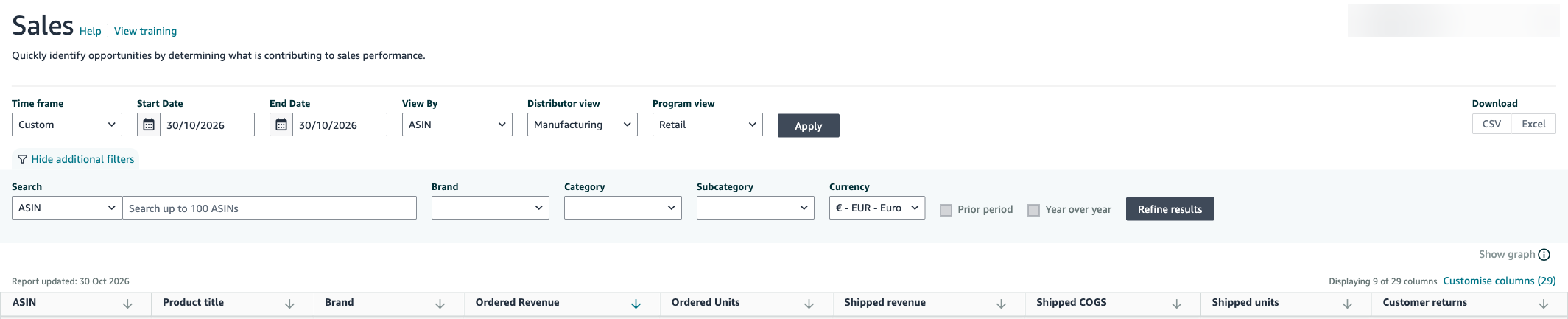
The Sales report (tab “Sales”) shows, per ASIN, what was ordered, shipped and returned. “Customise columns” adds more, such as NetPPM %, ASIN confirmation % and unfilled customer ordered units.
- Ordered Revenue and Ordered Units: revenue and quantity of orders in the selected period, net of returns. Manufacturing view only.
- Shipped Revenue: revenue of the units Amazon shipped to customers.
- Shipped COGS: the same shipments, valued at the price Amazon paid the vendor, net of returns.
- Shipped Units: number of units shipped to customers.
- Customer Returns: number of units customers returned.
Sell-in: how much a manufacturer sells to a retailer such as Amazon. Sell-out: how much the retailer sells to end customers. Shipped Revenue and Ordered Revenue measure sell-out at Amazon’s selling prices. Shipped COGS values the same units at the purchase price, which makes it the closest figure to the value of sell-in.
Inventory (formerly Inventory Health)
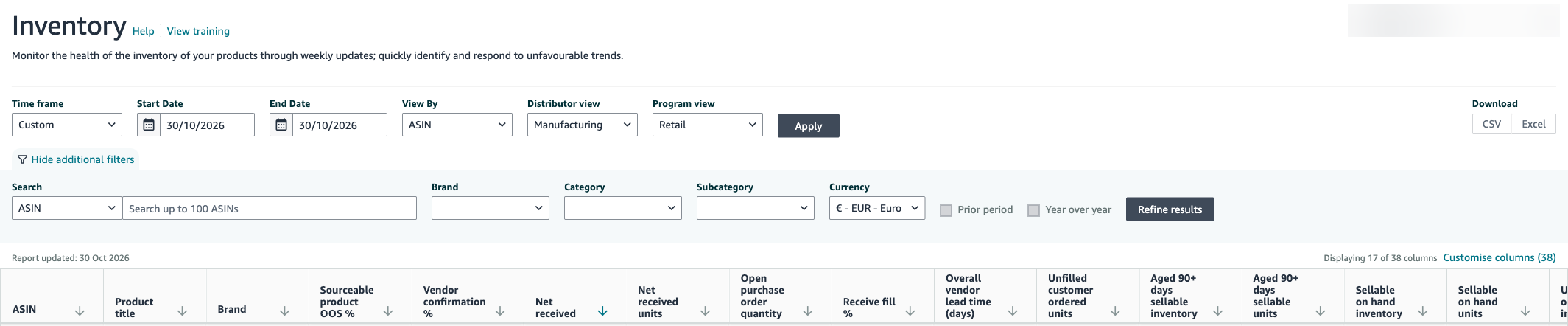
The Inventory report (tab “Inventory”) shows how many pot sets Amazon can still sell, how many have been in stock for a long time and how much is on order. The table uses the column names from Vendor Central. Two metrics exist only in the API, not in Vendor Central.
| Metric (Amazon) | Meaning |
|---|---|
| Sellable on hand units / inventory | sellable units in Amazon’s warehouse, as a count and at cost |
| Unsellable on hand units / inventory | units that cannot be sold because of their condition |
| Aged 90+ days sellable units / inventory | sellable units that have been in the warehouse for at least 90 days |
| Unhealthy Inventory (API only) | overstock, measured against expected demand |
| Net received units / Net received | goods received minus returns to the vendor |
| Open purchase order quantity | units in open purchase orders (POs) |
| Unfilled customer ordered units | units customers ordered that have not shipped yet |
| Sell-Through Rate (API only) | shipped units minus customer returns, divided by stock at the start plus units received |
| Vendor confirmation % | share of the units Amazon ordered that you confirmed |
| Receive fill % | share of the ordered units that arrived at Amazon |
| Overall vendor lead time (days) | days from the order to receipt at Amazon |
| Procurable product OOS % | share of page views where a procurable product was out of stock (plus Sourceable product OOS %) |
Pay special attention to items that are out of stock at Amazon. An empty warehouse costs sales and can weaken a product’s search rankings over time. For each of these items, check the open purchase orders: is a replenishment on order? If there is no open PO either, Amazon may have lost interest in the item. Then talk to Amazon. At the same time, check your own processes: do you confirm orders on time? Are there problems in shipping?
Sellers do not find their FBA inventory here, but in the inventory files in Seller Central.
Traffic
The Traffic report shows page views per ASIN. Amazon calls them “Featured offer page views” there; they used to be called Glance Views. They count how often shoppers viewed the product detail page. The figure exists only in the Manufacturing view. You have to calculate the conversion rate yourself, because ARA no longer provides it: ordered units divided by glance views.
Forecasting
The Forecasting report shows the customer demand Amazon expects per ASIN and week. Amazon provides four values: the mean and the levels P70, P80 and P90. You always see only the latest forecast, in the Data Kiosk up to 47 weeks ahead.
P80 means: there is an 80% probability that demand will not exceed the forecast quantity. For OLMERAK, this means: if you plan with a higher P-level, you hold more pot sets as a precaution. With P90, it is more stock than with the mean.
Net PPM (Net Pure Product Margin)
Net PPM is Amazon’s net margin on your products, per ASIN and in total. Amazon describes it as the actual product profitability after costs. Amazon takes into account the cost of goods, vendor funding and sales discounts. This way OLMERAK sees whether the pot set and the frying pan are profitable for Amazon. More on this in our article on vendor profitability.
Rapid Retail Analytics: hourly near real-time data
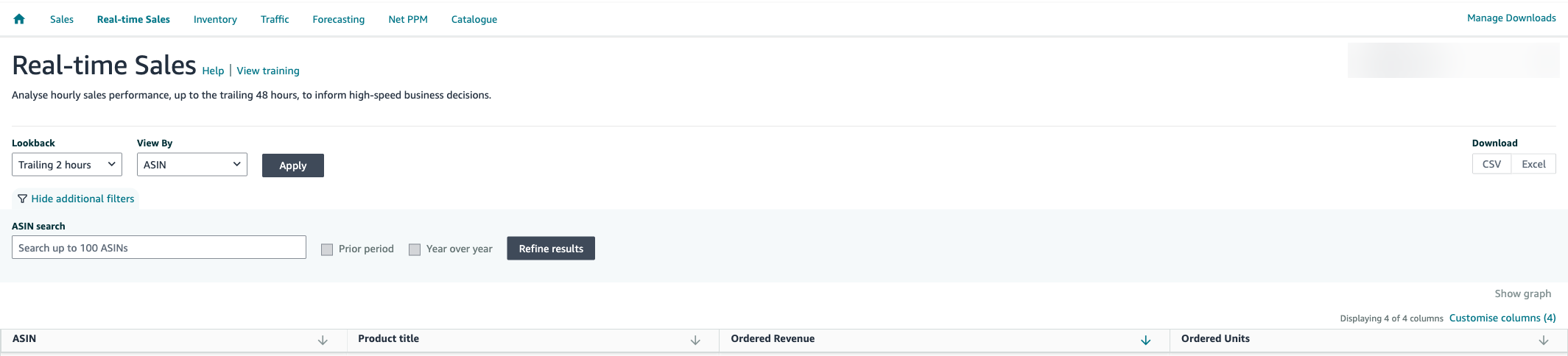
Rapid Retail Analytics delivers hourly sales, traffic and inventory data through the SP-API. In Vendor Central, the ARA tab “Real-time Sales” shows only the sales part: ordered revenue and ordered units per hour, for up to the last 48 hours.
In the API, there have been three reports since 2023:
- Sales: ordered units and ordered revenue per ASIN and hour.
- Traffic: glance views per ASIN and hour.
- Inventory: Highly Available Inventory. These are the sellable units minus the units already in shopping carts or reserved for other orders, for example for Subscribe & Save.
You get the data through the Amazon SP-API, as reports and notifications. For this you need developers or a tool that pulls the data. Amazon lists Germany and the other EU marketplaces as available.
You can pull an hour’s sales and inventory about 5 minutes after the hour ends, traffic later. The data goes back 30 days. Each request covers at most 14 days of sales or 7 days of inventory.
| Report | Frequency | Lookback |
|---|---|---|
| Standard reports (Sales, Inventory, Traffic) | day to year, 48 to 72 hours delay | daily figures up to 4 years |
| Rapid Retail Analytics | hourly, a few minutes delay | 30 days |
Ordered units below zero? That can happen in a given hour: Amazon books cancellations at the time they happen. The hourly glance views do not exactly match the figures in the Vendor Central dashboard either. Use Rapid Retail Analytics for the current day and the standard report for finished days.
What happened to the Sales Diagnostic and Inventory Health reports?
The Sales Diagnostic and Inventory Health reports were dashboards in Brand Analytics. According to service providers, Amazon switched them off during the 2022 rebuild. Their content now lives in the Sales report and the Inventory report of ARA. Some metrics no longer exist; you can recalculate some of them yourself. ARA today has no page called Sales Diagnostic.
| Old metric | Today |
|---|---|
| Conversion rate | ordered units divided by page views |
| Average sales price | shipped revenue divided by shipped units |
| Lost Buy Box (LBB) | only as lostFeaturedOffer in the Data Kiosk |
| RepOOS | Procurable product OOS % in the Inventory report |
| Replenishment category | Replenishment Category in the Catalogue tab |
| Free replacements, subcategory sales rank | discontinued |
Track stock and days of cover with AMALYTIX Vendor Inventory
How long will the OLMERAK pot set’s stock at Amazon last? For that you need the inventory and the sales from the Sales report, and you have to combine both ASIN by ASIN. With five products, a spreadsheet does the job. With 500 products on several marketplaces, the same chore comes back every week.
Vendor Inventory in AMALYTIX pulls the Sales and Inventory reports through the Amazon API and shows the days of cover per product and marketplace. Days of cover are the sellable stock divided by the average daily sales of the last 28 days. Sourcing and Manufacturing appear as separate columns side by side. Stock, goods older than 90 days and open POs arrive daily; sell-through rate, overstock, out-of-stock rate and fill rates weekly. You can export the list to Excel.
OLMERAK 5-Piece Pot Set, Stainless Steel
B0EXAMPLE2
- Sellable1,350$33,750
- Unsellable14$350
- Overstock620$15,500
- Aged over 90 days480$12,000
Stock older than 90 days. The smaller, the better.
For the OLMERAK 5-piece pot set, 1,350 sellable units sit at Amazon, plus 14 unsellable ones. Amazon classifies 620 units as overstock, and 480 are older than 90 days. At a cost of $25 per unit, that is the $12,000 in aged stock from the opening example.
Days of cover are calculated from past sales. They do not predict how many pot sets will sell next week. If Amazon delivers no new reports, the values stay empty: after 14 days for daily data, after 21 days for weekly data. Each marketplace stands on its own; amounts are not converted into another currency. The numbers give you the basis for your talk with Amazon: do you need replenishment, or does overstock have to go? You decide.
See stock, aged stock and days of cover for all your vendor products in one list, instead of merging two reports from Vendor Central. Start your 14-day free trial
Conclusion
For vendors, Amazon Retail Analytics is the most important free data source on sales, inventory and margin. Before you plan replenishment or talk to Amazon about aged stock, check these points:
-
Check the view
Sourcing and Manufacturing show different ASINs. Ordered Revenue and page views exist only in Manufacturing.
-
Read the P-levels correctly
P80 means: there is an 80% probability that demand will not exceed the forecast.
-
Hold out-of-stock items against open POs
No stock and no open order is a signal to talk to Amazon.
-
Pick the right report for the period
Rapid Retail Analytics for the current day, the standard reports for finished days.
-
Calculate metrics yourself
ARA no longer provides conversion rate and average price. Divide units by page views and revenue by units.
Amazon Retail Analytics FAQ
How much does Amazon Retail Analytics cost?
Nothing. Amazon Retail Analytics is free for vendors in Vendor Central. There is no paid tier today.
What was ARA Premium, and does ARA Basic still exist?
According to service providers and trade media, ARA Premium was the paid tier until 2020, at about $30,000 a year, and ARA Basic the free one. In 2020, ARA Premium became Brand Analytics. Today there is only one ARA, with no Basic and no Premium.
Can sellers use Amazon Retail Analytics?
No, ARA is for vendors only. Sellers find similar sales and traffic data in the Business Reports in Seller Central and, through the API, in the report GET_SALES_AND_TRAFFIC_REPORT.
What is the difference between Sourcing and Manufacturing?
Sourcing covers the ASINs Amazon buys directly from your vendor group. Manufacturing covers all ASINs you manufacture, even if Amazon buys them from a wholesaler.
What does Shipped COGS mean?
Shipped COGS is the value of the units shipped to customers, valued at the price Amazon paid the vendor and net of returns.
Is there real-time data for vendors?
Yes, with Rapid Retail Analytics. It delivers sales, page views and available inventory per hour, going back 30 days. Amazon provides the data through the SP-API. In Vendor Central, the “Real-time Sales” tab shows only sales and units for the last 48 hours.
Can I pull ARA data through the API?
Yes. For vendors, the SP-API offers reports on sales, inventory, traffic, forecasting, Net PPM and Rapid Retail Analytics. The Data Kiosk also bundles the vendor metrics in one dataset.
Can vendors see the Search Query Performance report?
No. In Vendor Central, Brand Analytics shows only the Top Search Terms, Repeat Purchase Behavior and Market Basket Analysis reports. The SP-API documentation also lists Search Query Performance for sellers only.
Subscribe to Newsletter
Get the latest Amazon tips and updates delivered to your inbox.
By subscribing you agree to our Privacy Policy .


