Alerts
As an Amazon seller or vendor, you face a growing challenge: the more products you sell, the harder it becomes to keep track of everything. Every day, listings can change, new sellers can hijack your products, inventory levels can run low, or ratings can decline.
AMALYTIX monitors every single product daily and automatically notifies you about relevant changes. This way, you never miss important developments and can react quickly before small issues become major problems.
Alerts Page Overview
The following video provides a good overview:
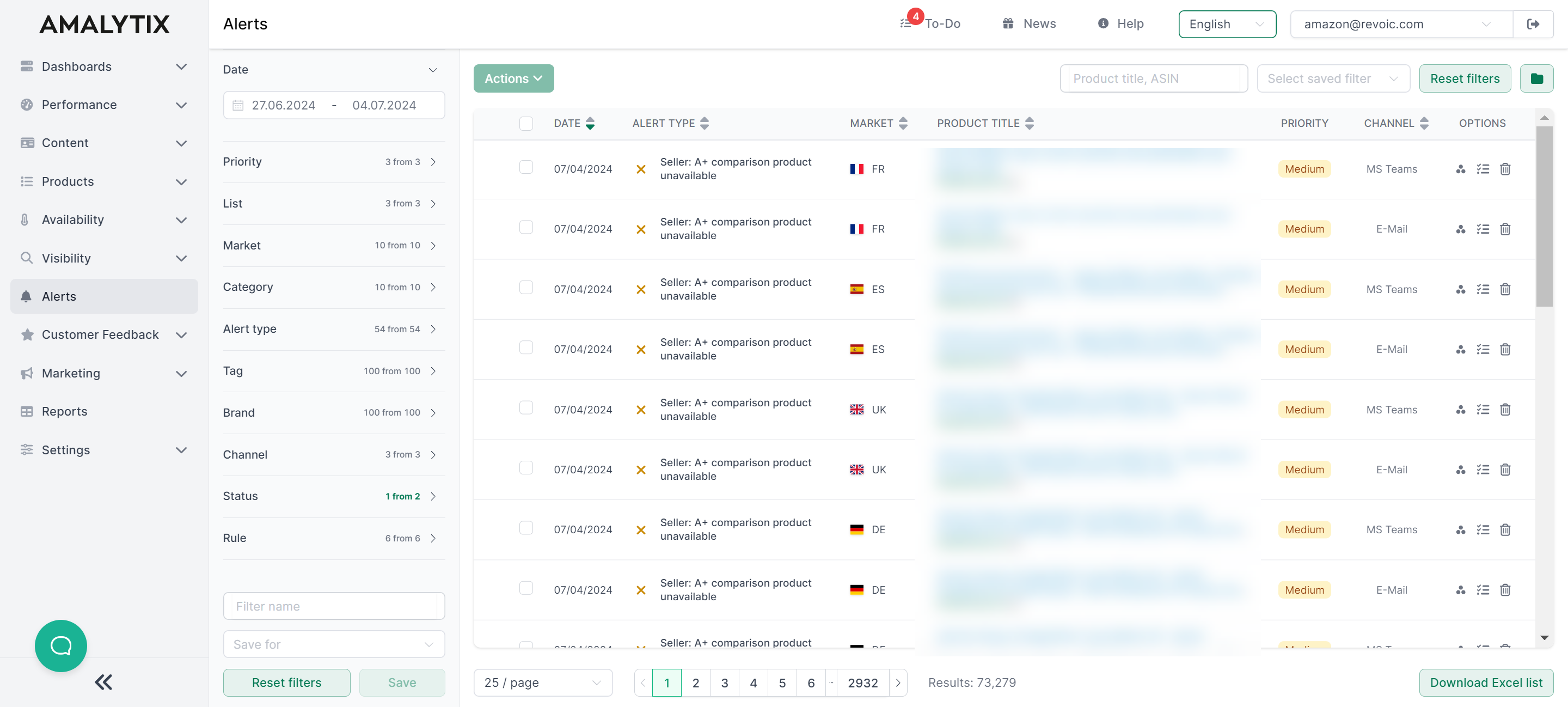
The Alerts page displays all detected changes in a clear table view. At a glance, you can see:
- Date: When the alert was created
- Alert Type: What kind of change was detected (with color-coded icon)
- Marketplace: Which Amazon marketplace the change occurred on
- Product: Which product is affected (with image, title, ASIN, and brand)
- Priority: How important the alert is (high, medium, low)
- Channel: Whether the alert relates to Seller, Vendor, or Watchlist products
More Topics
- Filtering and Working — Filter, find and work with alerts
- Configuring Alerts — Manage and customize alert rules
- All Alert Types — Overview of all available alert types
Alerts Video Guide
How to create alerts is briefly described in this video:
Reports
You can also export all alerts as a report. Go to the Alerts report and set the appropriate time period.
Alerts Report
- Description: Contains all alerts for the selected time period
- Type: Seller and Vendor
- Category: Alerts
You can find a list of all columns in this report here.