Insights
The Insights page provides you with a comprehensive view of your Amazon Advertising performance. Here you can find aggregated metrics, identify optimization opportunities, and spot problems before they lead to significant losses.
Why does this matter?
- Keep an overview: See all important KPIs at a glance
- Find weaknesses: Automatically identify underperforming campaigns
- Discover opportunities: Find products you’re not yet advertising
- Optimize budget: Identify campaigns that pause due to budget constraints
Available tabs
The Insights page offers five different analysis views:
| Tab | Description |
|---|---|
| Overview | Aggregated KPIs and time series |
| Distribution | Revenue and cost distribution by campaign type |
| Flop Lists | Automatically identified underperforming elements |
| Missing Products | Products without active advertising despite revenue potential |
| Low Budget | Campaigns with budget issues and history |
Overview
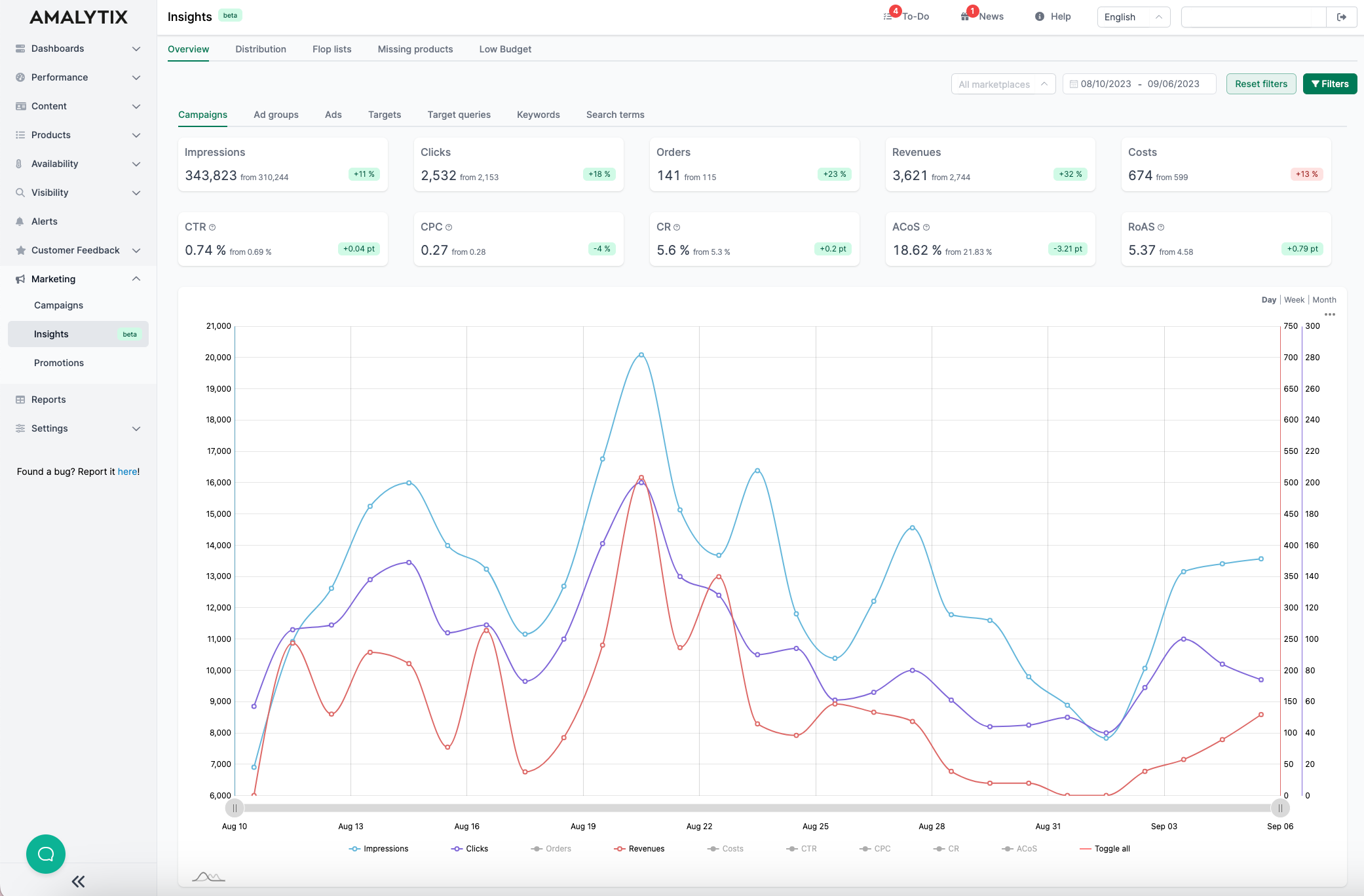
The Overview shows you aggregated metrics for all your campaigns, ad groups, ads, targets, and search terms:
Available metrics:
- Impressions: Total number of ad impressions
- Clicks: Total number of clicks on your ads
- Orders: Orders generated through advertising
- Revenue: Revenue generated through advertising
- Costs: Total advertising spend
- CTR (Click-Through-Rate): Ratio of clicks to impressions
- CPC (Cost per Click): Average cost per click
- CR (Conversion Rate): Ratio of orders to clicks
- ACoS (Advertising Cost of Sales): Advertising costs relative to revenue
- RoAS (Return on Advertising Spend): Revenue relative to advertising costs
You can switch between different aggregation levels (campaigns, ad groups, ads, targets, search terms) and display data by day, week, or month.
Distribution
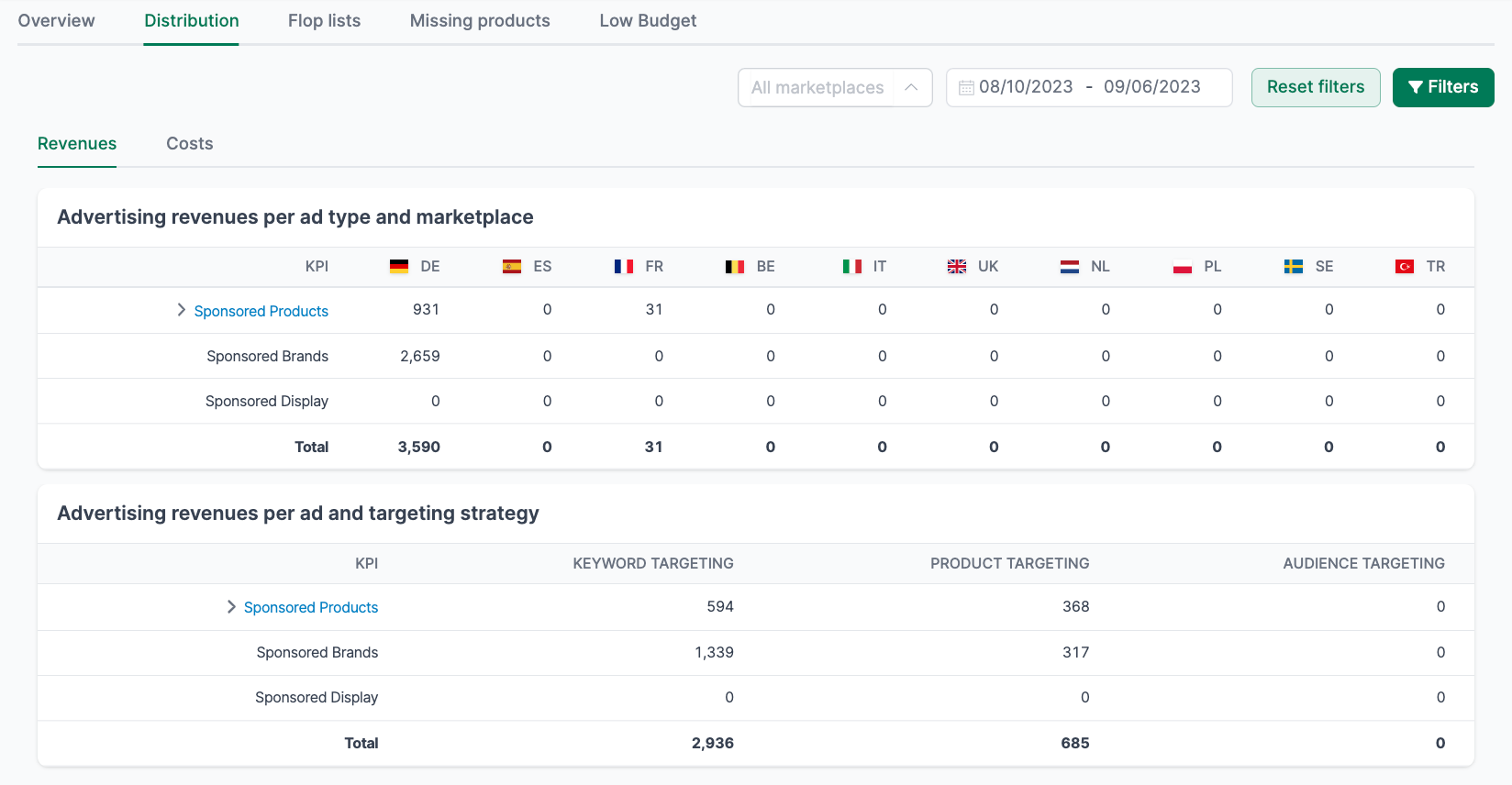
On the Distribution page, you can see how your revenues and costs are distributed across different advertising formats:
Revenue distribution by campaign type:
- Sponsored Products
- Sponsored Brands
- Sponsored Display
Revenue distribution by targeting method:
- Keyword Targeting
- Product Targeting
- Audience Targeting
This breakdown helps you understand which advertising formats contribute most to your success.
Flop lists
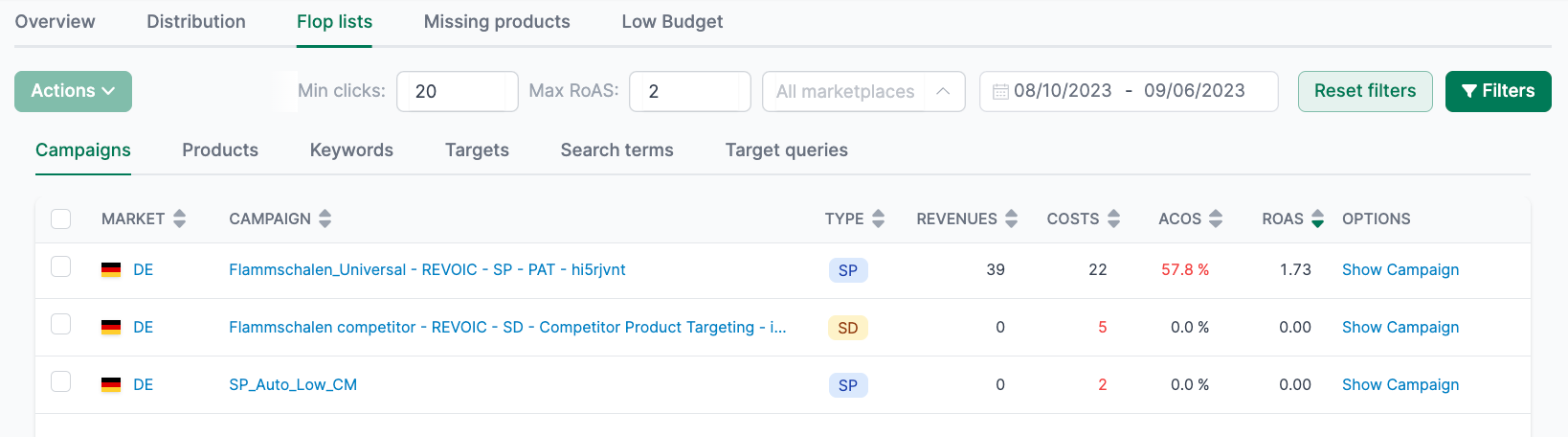
The flop lists automatically identify campaigns, ad groups, and targets that are performing poorly. This saves you time on manual analysis.
Default filters:
- At least 20 clicks (sufficient data for meaningful insights)
- RoAS less than or equal to 2 (equivalent to an ACoS of 50% or more)
You can adjust these filters at any time to apply stricter or more lenient criteria.
Benefits of flop lists:
- Quickly identify wasted spend
- Take targeted optimization actions
- Regular monitoring without manual filter work
Missing products
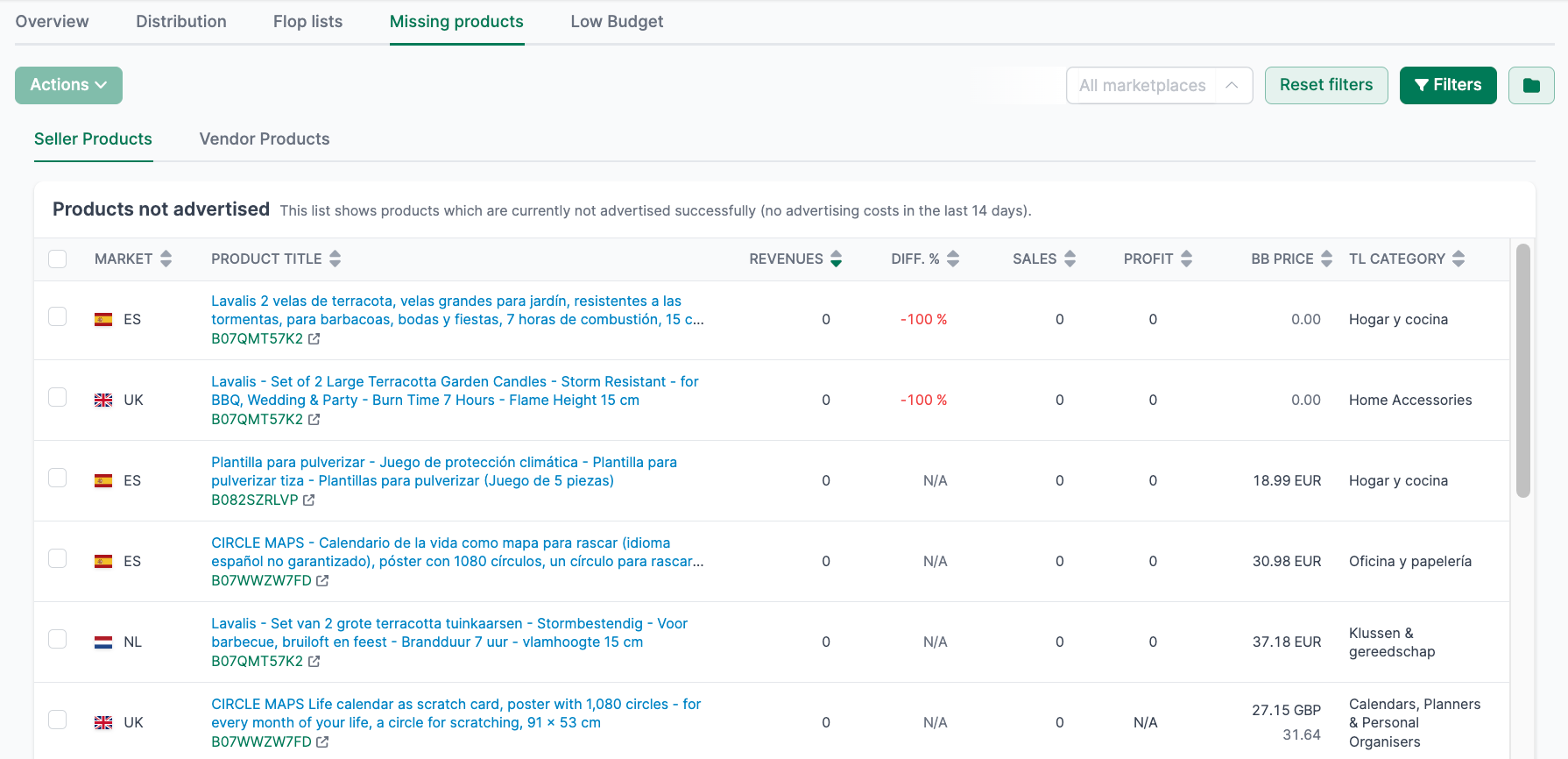
This page shows you products that are not being actively advertised despite their revenue potential. Identifying these products is important as they represent growth opportunities.
Available information:
- Marketplace: Which marketplace the product is sold on
- Product Title: Name of the product
- Revenue: Current organic revenue
- Difference: Potential revenue increase through advertising
- Sales: Units sold
- Profit: Current profit
- Buy Box Price: Current selling price
- Main Category: Product category
Low budget
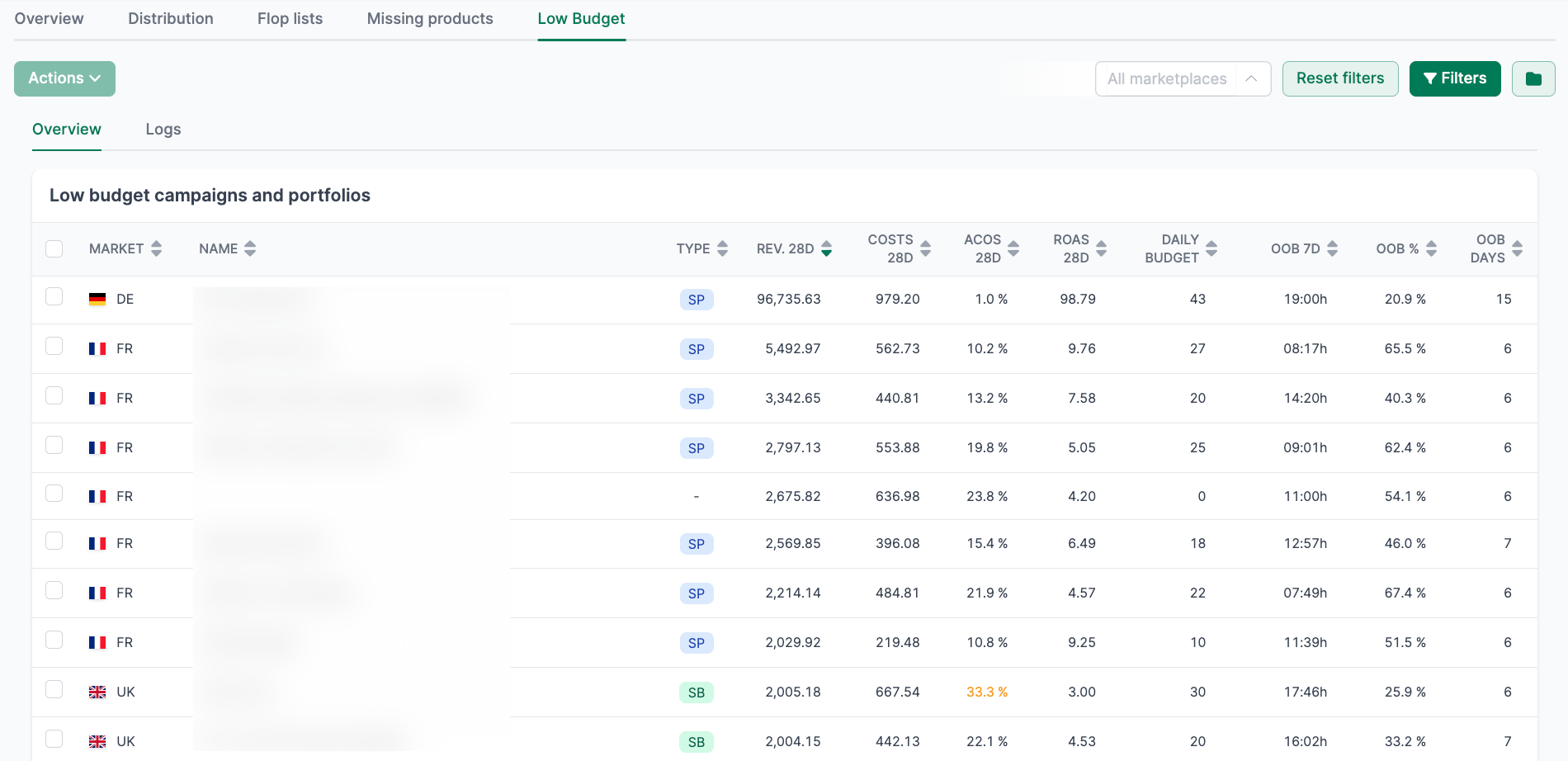
This page helps you identify and fix budget issues with your campaigns.
Overview tab
Shows campaigns whose daily budget is regularly exhausted:
Available information:
- Marketplace: Campaign marketplace
- Name: Campaign name
- Type: Sponsored Products, Sponsored Brands, or Sponsored Display
- Revenue (last 28 days): Generated advertising revenue
- Costs (last 28 days): Advertising spend
- ACoS (last 28 days): Advertising Cost of Sales
- RoAS (last 28 days): Return on Advertising Spend
- Current daily budget: Set budget
- Average time without budget: How long the campaign was paused on average
If a profitable campaign regularly exhausts its budget, you’re missing potential revenue. In these cases, increase the daily budget.
Logs tab
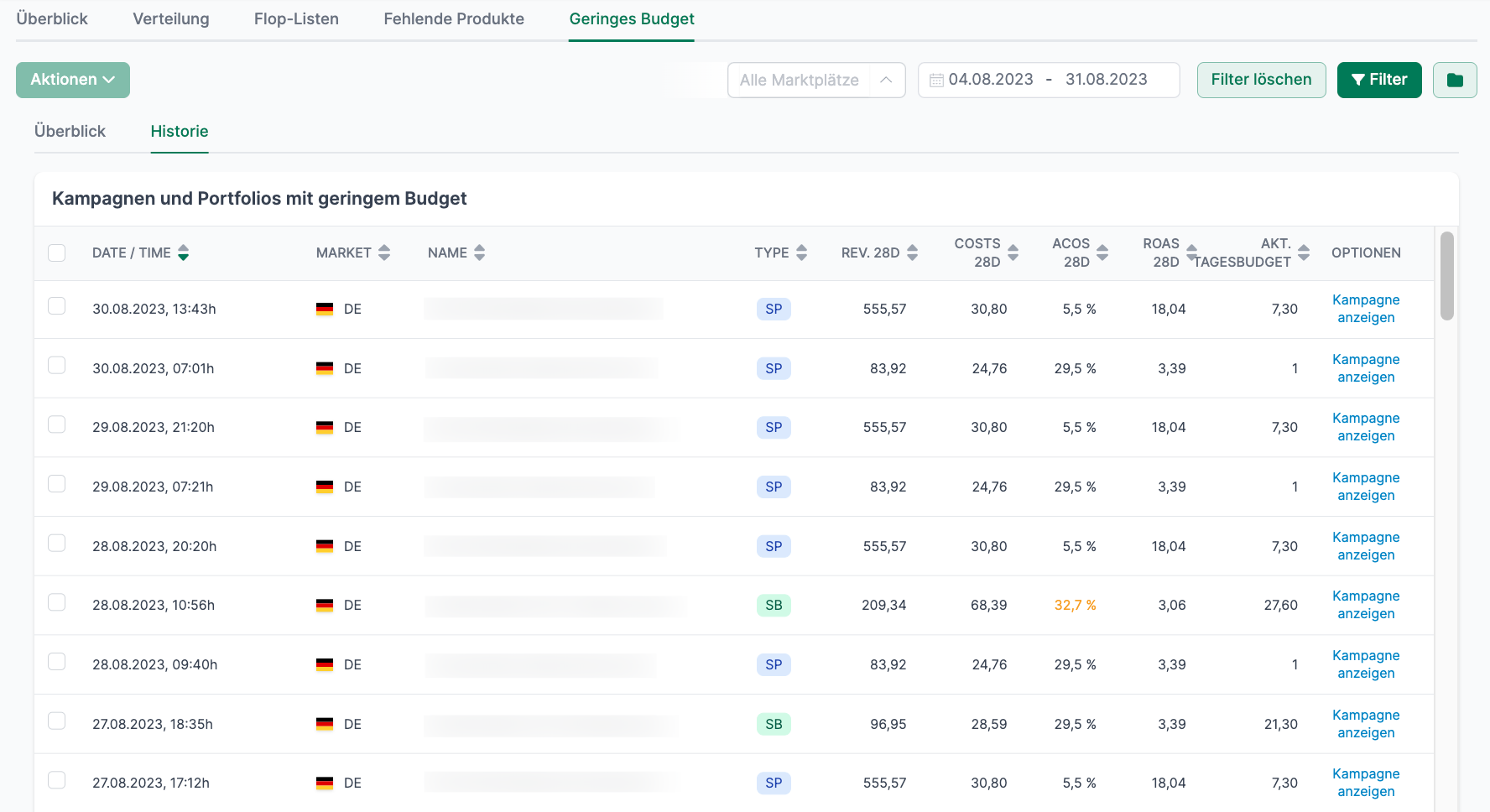The Logs show you exactly when your campaigns paused due to budget constraints in the past:
Available information:
- Date/Time: When the budget was exhausted
- Marketplace: Affected market
- Name: Campaign name
- Type: Campaign type
- Performance metrics for the last 28 days
- Current daily budget
This information helps you identify patterns and optimize your budget planning.
Filters and time period
All Insights pages offer filters for:
- Time period: Start and end date of the analysis
- Marketplace: Restriction to specific markets
- Advanced filters: Additional criteria depending on the tab
Related features
- Campaigns - Detailed campaign management and optimization
- Coupons - Monitor coupon performance
- Promotions - Track promotions and deals