Monitor Amazon Seller Orders
The Seller Orders page gives you a complete overview of all Amazon orders from your Seller accounts. Stay in control of your incoming orders and react quickly to changes.
Why This Page Matters
- Centralized view: See all orders from all marketplaces in one place
- Quick response: Immediately spot cancelled orders or unshipped items
- Check profitability: Evaluate the profitability of individual orders with the P&L feature
- Identify trends: Recognize bestsellers and potential issues early
Overview of All Orders
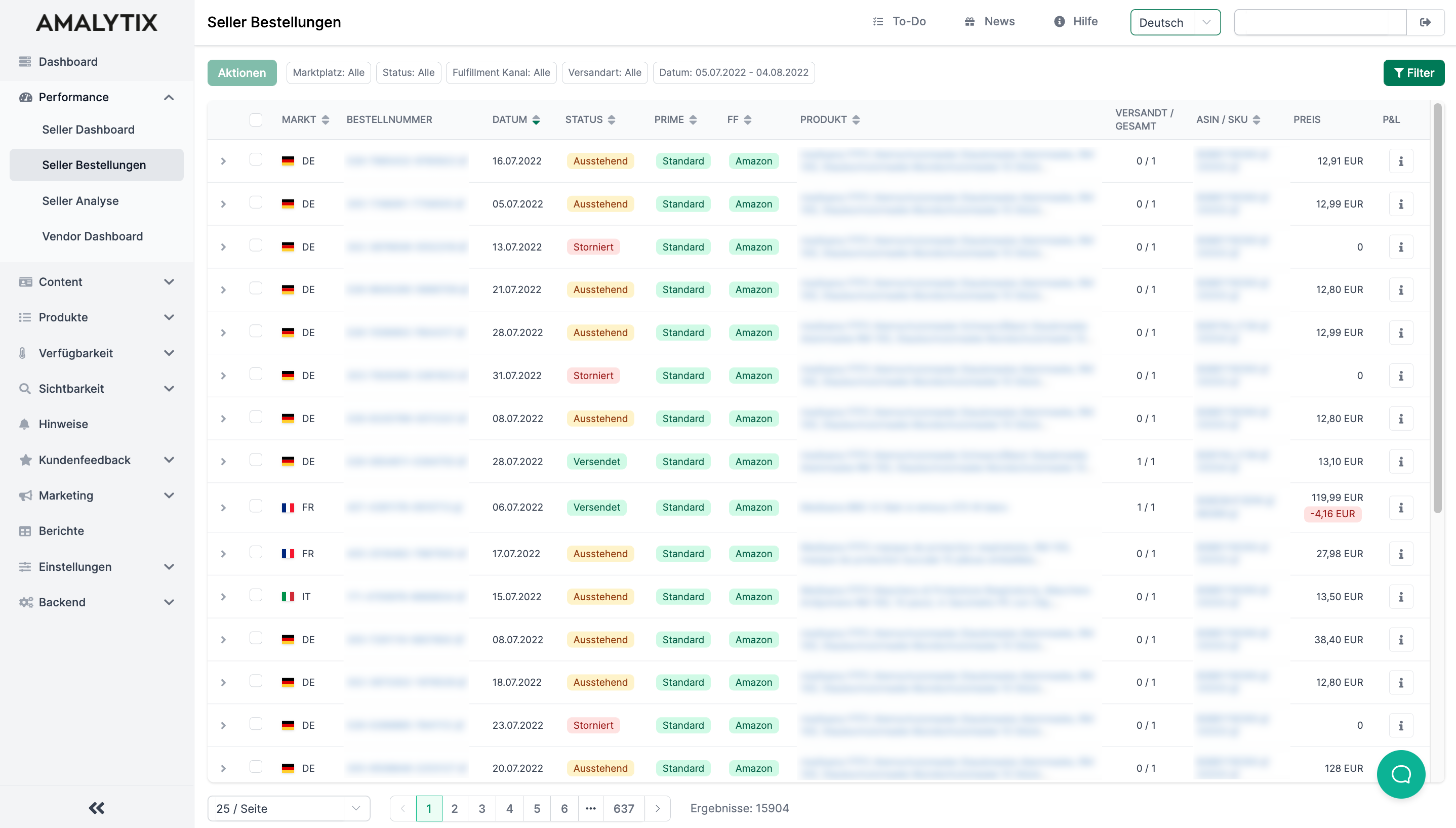
Navigate to Performance > Seller Orders to find a table with all your orders. Data is updated every 30 minutes.
Displayed Information
The table shows the following columns:
| Column | Description |
|---|---|
| Market | The Amazon marketplace where the order was placed |
| Order ID | The unique Amazon order number (links to Amazon) |
| Date | The order date |
| Status | Current order status: Shipped, Pending, Cancelled, Unshipped, or Shipping |
| Prime | Shipping method: Priority, Prime, Standard, or Next Day |
| FF | Fulfillment channel: FBA (Fulfillment by Amazon) or FBM (Fulfillment by Merchant) |
| Dest. | The customer’s delivery country |
| Product Title | Name and image of the ordered product |
| Shipped / Total | Ratio of shipped items to total items |
| ASIN / SKU | Amazon product identifier and your internal SKU |
| Price | Order value including any discounts |
| P&L | Profit and Loss breakdown per order (info icon) |
Filter Options
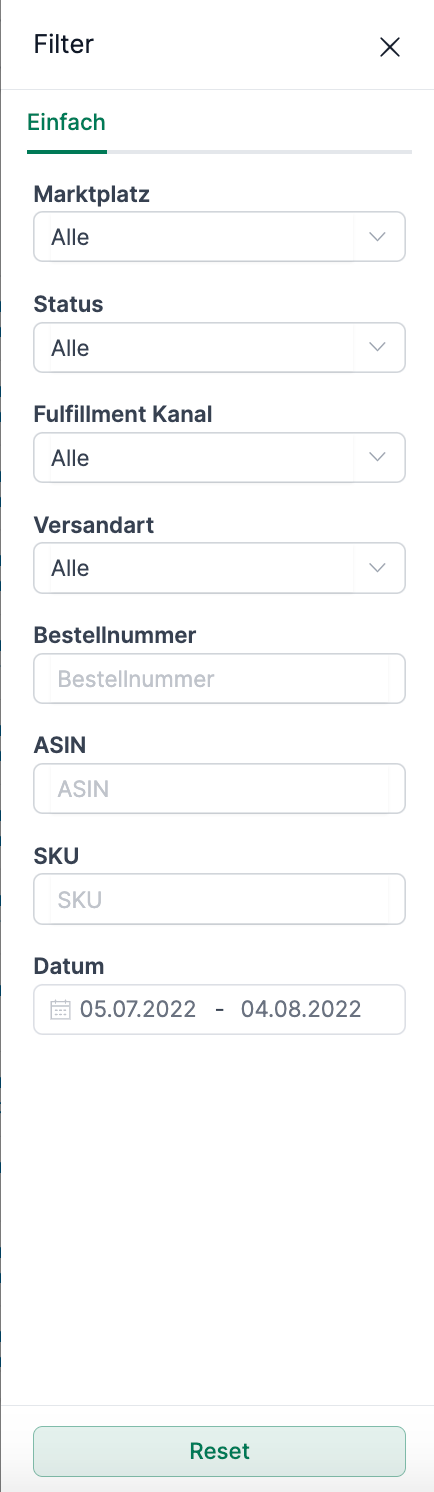
Use filters to search for specific orders. Click the Filter button to open the filter panel.
Available Filters
- Date: Select a date range
- Marketplace: Filter by a specific Amazon marketplace
- Status: Show only orders with a specific status
- Fulfillment Channel: FBA or FBM
- Ship Service Level: Priority, Prime, Standard, etc.
- Order ID: Search for a specific order
- ASIN: Filter by a specific product
- SKU: Filter by your internal SKU
- Destination: Filter by delivery country
Save Filters
You can save frequently used filter settings and recall them with a single click. Use the Saved Filters feature above the table.
Order Details
Click on any row in the table to expand and view the order details. The expanded view shows all line items of the order including:
- ASIN and SKU of each product
- Ordered quantity
- Unit price and total price
- Applied discounts
P&L Overview (Profit and Loss)
Hover over the info icon in the P&L column to see a detailed breakdown of costs and profit for that order.
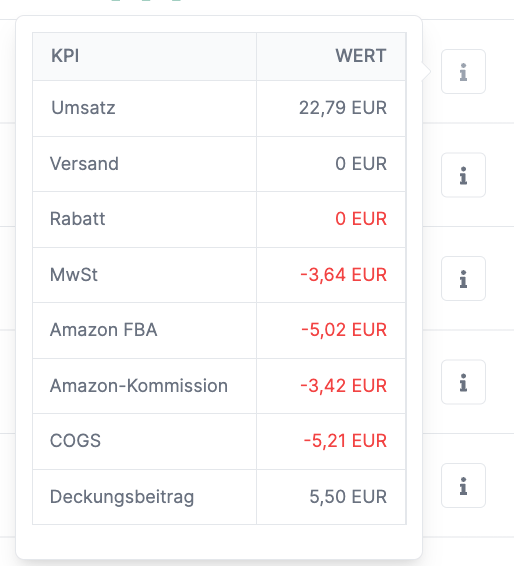
The P&L overview shows:
- Revenue: Sales revenue
- Refunds: Refunded amounts
- Shipping: Shipping fees from customer
- Gift wrap: Gift wrap revenue
- Promotions: Applied discounts
- VAT: Value added tax
- Amazon Costs: Total Amazon fees
- Amazon FBA: FBA fulfillment fees
- Amazon Commission: Selling commission
- Shipping Costs: Your shipping costs (for FBM)
- COGS: Cost of goods sold (if configured)
- Profit: Calculated contribution margin
Note: P&L data is provided by Amazon and becomes available once Amazon transmits the corresponding financial data.
Excel Export
Click Download Excel List at the bottom of the table to export all displayed orders as an Excel file. The export respects your current filter settings.
Alerts
AMALYTIX can automatically notify you about important events with your orders. You can activate the following alerts:
- Unusual Orders: Notification when there are unusually many or few orders for a product
- Unusual Return Rate: Notification when the return rate is unusually high or low (weekly check)
- No Sales in the Last 7 Days: Warning when a product has no sales for a week
- No Sales in the Last 30 Days: Warning after a month without sales
- No Sales in the Last 60 Days: Warning after two months without sales
- No Sales in the Last 90 Days: Warning after three months without sales
Go to Settings > Alerts to activate these notifications.
Reports
You can also export your order data as a report. Go to Reports and select one of the following report types:
Orders Report (Individual)
- Content: All orders and order items in detail
- Type: Seller
- Category: Performance
- Use case: Detailed analysis, accounting, tracking individual orders
Orders Report (Per Day)
- Content: Daily summary with revenue, order count, and ordered units
- Type: Seller
- Category: Performance
- Use case: Trend analysis, revenue overviews, marketplace comparisons
You can restrict the marketplace and date range to export only relevant data.
A complete list of all available columns can be found in the reports overview.
Related Pages
- Seller Dashboard: Overall view of your Seller performance
- Seller Payments: Overview of your Amazon payouts
- Reports: All available report types