Billing
On the Settings / Subscription page, you manage your AMALYTIX plan, billing information, and view your invoices. The page is divided into four sections:
- Plan - Your current plan and upgrade options
- Billing Address - Your billing information
- Invoices - All previous invoices as PDF
- Credits - Balance for additional services
Plan
Here you can see which plan you are currently using and how much of the included resources you are utilizing.
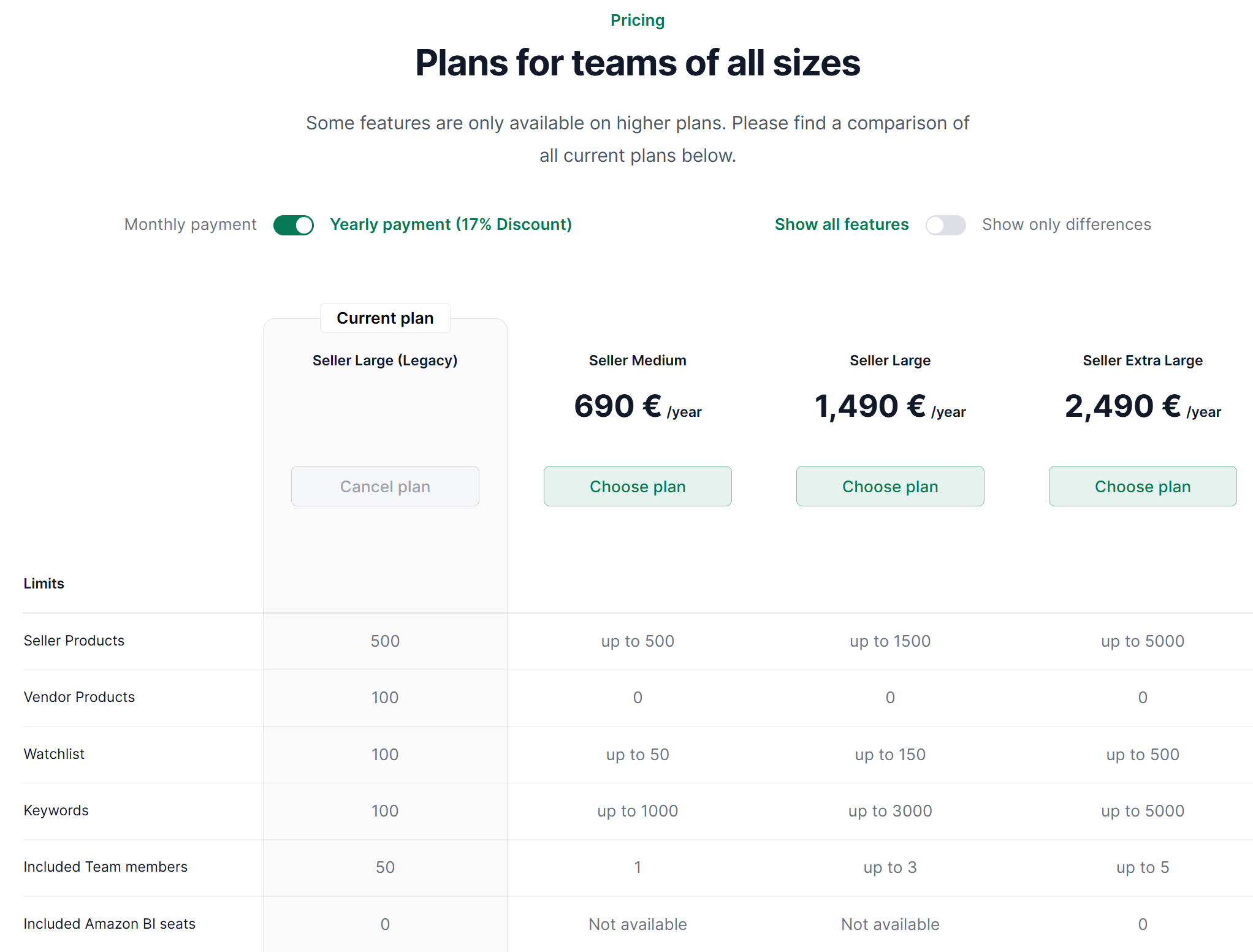
Change Plan
To switch to a different plan, click Change Plan. You can choose between various plans that differ in the number of monitored products and available features.
Billing Period
You can choose between two billing options:
| Period | Benefits |
|---|---|
| Monthly | Flexible, cancel anytime |
| Annually | Discount on the total price |
Add Payment Method
To switch to a paid plan, you must first add a payment method. We use Stripe as our payment provider - your credit card details are not stored on our servers.
Billing Address
Here you store and edit your billing information such as company name, address, and VAT ID. This information appears on your invoices.
Invoices
In this section, you will find all your previous invoices. You can download each invoice as a PDF.
Credits
Credits are balance that you can use for certain additional services in AMALYTIX. Here you can see your current credit balance and usage history.
If you need additional credits, please contact our support team.
Related Topics
- Manage Products - Product limits and hidden products
- Connect Amazon Account - Link your Seller or Vendor account