Monitor your coupons
With the coupon overview in AMALYTIX, you can keep track of all your Amazon coupons. Coupons are discount promotions that customers see on product detail pages or in search results and can activate with a single click.
Why does this matter?
- Control budget: See at a glance how much budget has been spent
- Measure performance: Track clips, redemptions, and generated sales
- Optimize timing: Identify which coupons are active and when they expire
- Assign products: See exactly which ASINs a coupon applies to
Coupons can be created by both sellers and vendors.
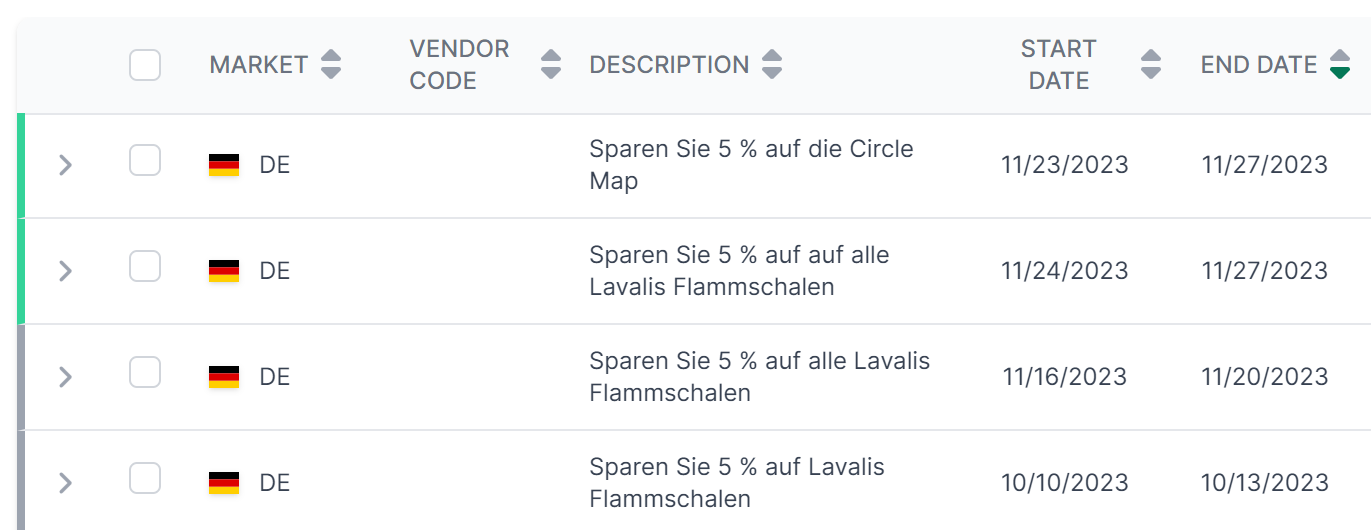
Coupon table overview
The table displays all your coupons with comprehensive details:
Status indicator
The colored bar on the left shows the current status of the coupon:
- Green: The coupon is active and can be redeemed
- Yellow: The coupon will start in the future
- Gray: The coupon has already expired
Available columns
| Column | Description |
|---|---|
| Marketplace | Marketplace where the coupon is running |
| Vendor Code | Your vendor code (for vendor accounts) |
| Campaign | Name of the coupon campaign |
| Description | Name or description of the coupon |
| Start | Start date of the coupon |
| End | End date of the coupon |
| Discount Type | Type of discount (percentage or absolute) |
| Subscribe & Save | Whether the coupon applies to Subscribe & Save |
| Discount Amount | Amount of discount (e.g., 5% or 2 EUR) |
| Budget | Total budget for the coupon |
| Used % | Percentage of budget already spent |
| Spent | Absolute amount of budget spent |
| Remaining | Remaining budget |
| Sales | Revenue generated through the coupon |
| Clips | How often the coupon was clicked/activated |
| Redemptions | Actual redemptions (purchases with coupon) |
| # Products | Number of ASINs the coupon applies to |
Understanding discount types
AMALYTIX distinguishes between two types of discounts:
- Percentage: A percentage discount on the product price (e.g., 10% off)
- Absolute: A fixed monetary amount as discount (e.g., 5 EUR off)
The type of discount is shown in the “Discount Type” column, and the amount in “Discount Amount”.
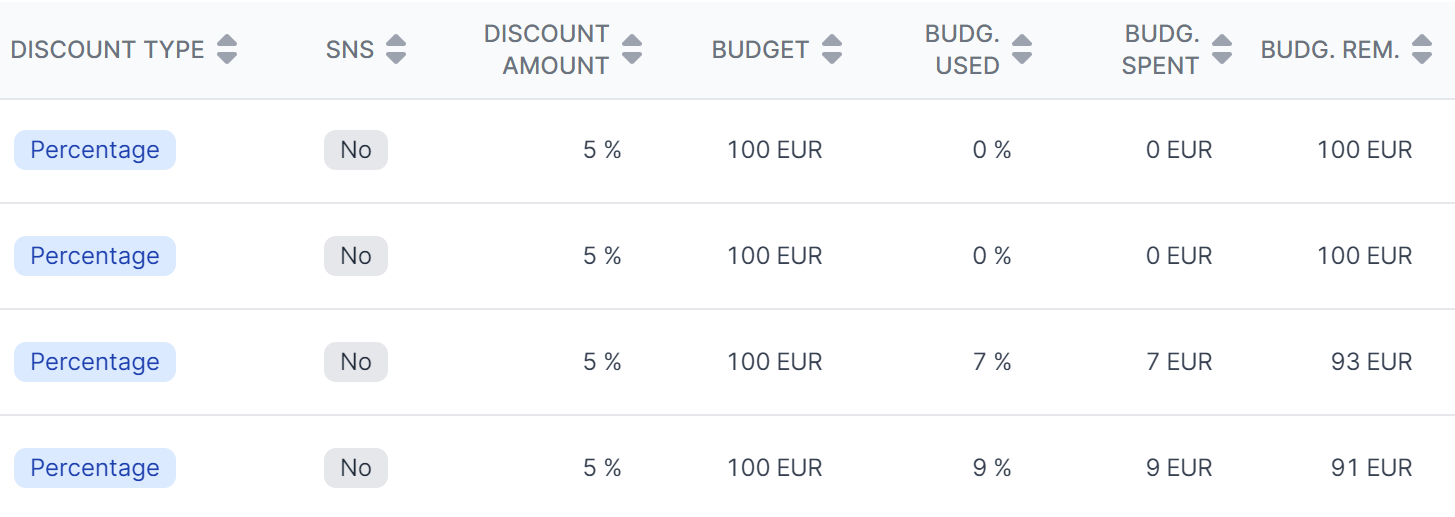
Budget monitoring
The budget columns help you track your coupon spending:
- Budget: The total budget you set for the coupon
- Used %: Shows what percentage of the budget has been spent (highlighted in red when above 80%)
- Spent: The absolute amount spent
- Remaining: The amount still available
When the budget is exhausted, the coupon is automatically deactivated.
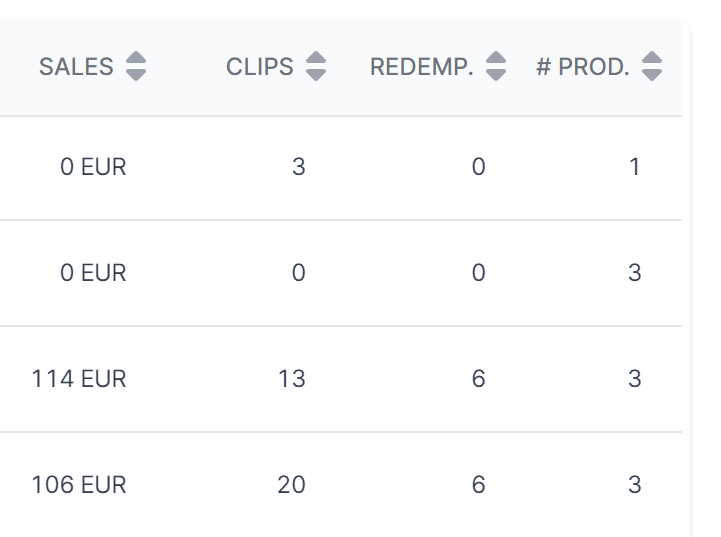
Performance metrics
The performance columns show you the success of your coupons:
- Clips: Number of customers who clicked on the coupon
- Redemptions: Number of actual purchases with the coupon
- Sales: Revenue generated from coupon purchases
The ratio of clips to redemptions gives you an indication of your coupons’ conversion rate.
Viewing products for a coupon
To see which products a coupon applies to:
- Click on the arrow next to the marketplace icon
- The associated ASINs will be displayed in an expanded view
Filtering and exporting
Filter by:
- Time period (start and end date)
- Marketplace
- Vendor Code
- Discount Type
- Name/Description
Export: Click “Download Excel list” to download all filtered coupons as an Excel file.
Related features
- Promotions - Monitor Lightning Deals, Best Deals, and price discounts
- Campaigns - Manage PPC campaigns