Seller FBA Dashboard
The Seller FBA Dashboard helps you keep track of your FBA inventory and reorder in time. This way, you avoid out-of-stock situations that can negatively impact your sales and ranking.
Overview
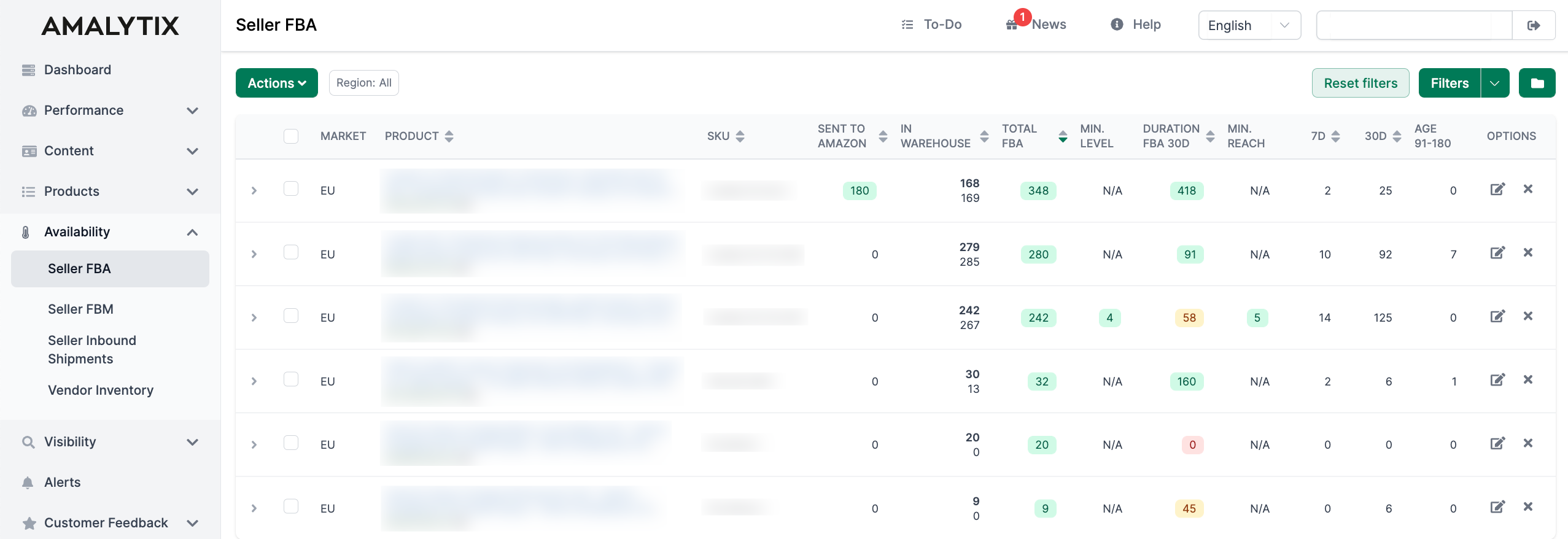
Under Availability > Seller FBA, you see all important metrics for your FBA inventory at a glance. Data is aggregated across all marketplaces and grouped by region (EU, NA, FE).
Column Details
The table displays the following information:
Basic Product Data
| Column | Description |
|---|---|
| Region | The Amazon region (e.g., EU, NA, FE). Click on a row to see individual marketplaces. |
| Product title | Name of the product. In expanded view, you also see the product image and ASIN. |
| SKU | Your item number (SKU) and FNSKU. Amazon notes are also displayed here (e.g., “Low traffic” or “Low conversion”). |
Inventory Levels
| Column | Description |
|---|---|
| Inbound FBA | Number of units currently in transit to Amazon. |
| In Warehouse | Top number: Current stock at Amazon. Bottom number: Amazon’s recommended stock level. Hover over the number to see the last update date. |
| Total FBA | Sum of warehouse stock and inbound quantities. Color indicates status: Red = below minimum, Yellow = below double minimum, Green = sufficient. |
| Min. Level | Your defined minimum stock level. Color shows whether current stock is sufficient. |
Stock Duration and Sales
| Column | Description |
|---|---|
| Duration FBA 30d | How many days your stock will last, based on the last 30 days of sales. Red = under 30 days, Yellow = under 60 days, Green = over 60 days. |
| Min. Reach | Your defined minimum reach in days (e.g., your lead time). Orange = reach too low, Green = sufficient. |
| Sales 7d / 30d | Number of units sold in the last 7 or 30 days. |
Inventory Age (important for storage fees)
| Column | Description |
|---|---|
| Age < 90 | Units in stock for less than 90 days. |
| Age 91-180 | Units between 91 and 180 days of storage age. |
| Age 365+ | Units over 365 days - higher storage fees apply. |
Additional Columns (enable via column filter)
Additional columns can be activated via the column filter (gear icon):
- Size - Product dimensions in cm
- Item volume / Total volume - Individual and total product volume
- Item weight - Product weight
- Storage fee - Estimated monthly storage costs
- Supplier order - Quantity ordered from your supplier (manually maintained)
- Ext. warehouse - Your own inventory outside of Amazon (manually maintained)
- Reserved inv. - Units reserved by Amazon
- Remote stock - Stock in remote warehouses
- Duration min/max - Minimum/maximum reach based on different time periods
- Duration incl. Ext. 30d - Reach including your external warehouse stock
- Sales 60d / 90d - Sales of the last 60 or 90 days
- LTSF 12m - Potential long-term storage fee (12 months)
- Price - Selling price
- Age 181-270 / 271-365 - Additional age ranges
Edit Products
Click the Edit icon in the Options column to adjust the following values:
- External warehouse - Your stock in your own warehouse
- Supplier order - Expected delivery from supplier
- Minimum inventory level - When you should reorder
- Minimum reach - Desired reach in days (lead time)
These values help AMALYTIX generate better inventory alerts.
Hide Products
Click the Eye icon to hide products you no longer want to actively monitor. Hidden SKUs are counted separately and can be unhidden at any time.
Actions
The Actions button provides the following functions:
- Go to SC Shipping Queue - Direct link to the Amazon Seller Central shipping queue
- Copy selected ASINs - Copies the ASINs of selected products to clipboard
Filters and Search
Use the Quick search at the top to filter by product title, ASIN, SKU, or FNSKU. For advanced filters, click Filter:
- Region
- Product name
- ASIN, SKU, FNSKU
- Min./Max. quantity
- Min./Max. duration 30d
- Min./Max. sales 30d
- Out of stock (yes/no)
- Show hidden products
- Tags
Frequently used filter settings can be saved and retrieved later.
Export Data
At the bottom of the table, you see:
- Hidden SKUs: Number of hidden products
- Merchandise value: Total value of your FBA inventory
Click Download Excel List to export all data as an Excel file.
Set Up Alerts
Get notified automatically when action is needed. The following alerts can be activated under Settings > Alerts:
| Alert | When it appears |
|---|---|
| Change of FBA shipping fee | The FBA shipping fee has changed |
| Stock below minimum | Stock falls below your defined minimum level |
| Inventory below minimum range | Reach falls below your defined minimum reach |
| Low inventory (< 30 days) | Stock only lasts about 30 days |
| Low inventory (< 60 days) | Stock only lasts about 60 days |
| Low inventory (< 90 days) | Stock only lasts about 90 days |
| SKU out-of-stock | No more FBA inventory available |
| Potential long-term storage fee | Long-term storage fees are imminent |
Reports
Export detailed data via Reports:
FBA Inventory Report
- Contains: Current stock, sales velocity, reach
- All columns can be found here
Customer Returns FBA
- Contains: All FBA returns from customers
- All columns can be found here
Related Pages
- Seller FBM Dashboard - Inventory for merchant fulfillment
- Seller Inbound Shipments - Shipments to Amazon
- Vendor Inventory - Inventory for vendors